Oct 21, 2026 Artificial Intelligence
Quick answer
AI agent integration connects AI agents to enterprise systems so they can use live data and take actions. Use MCP for reusable, dynamic tool access, APIs and event streams for fixed workflows, A2A for collaboration between agents, and RPA for legacy systems. Secure everything with user-scoped permissions, human approvals and audit logs.
Most AI agents look impressive in a demo. The trouble starts when the same agent has to read a live order from SAP, update a ticket in ServiceNow and respect the access rights of the person asking. Gartner predicts that over 40% of agentic AI projects will be canceled by the end of 2027, citing escalating costs, unclear business value and inadequate risk controls. Much of that cost and risk is decided by one engineering problem: AI agent integration.
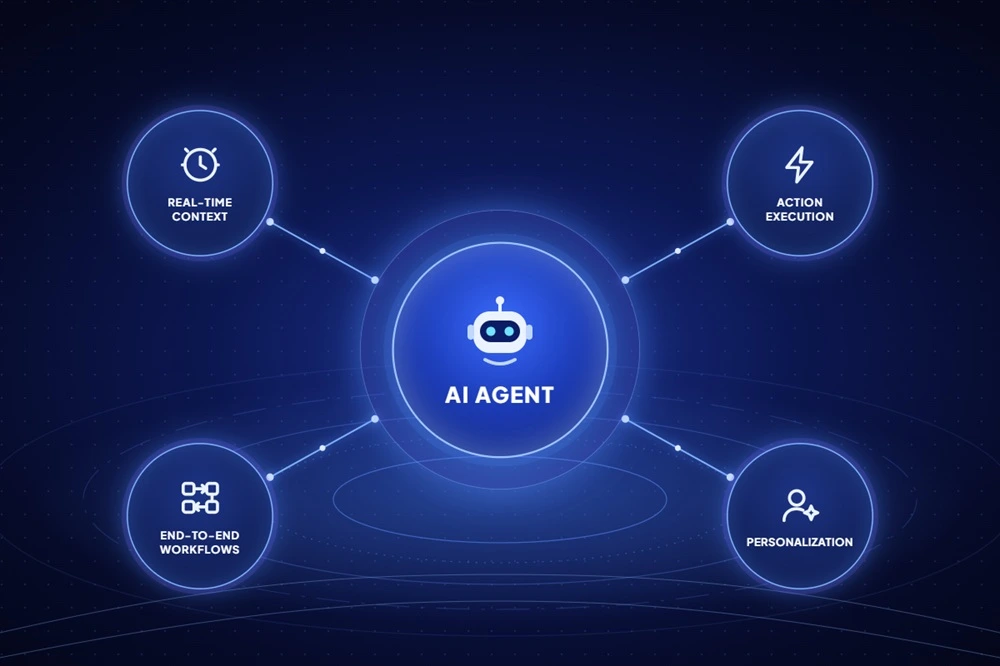
An agent without access to your systems of record can only talk. An integrated agent can pull live context, take actions and finish a workflow from start to end.
This guide explains how AI agent integration works, how MCP, APIs, A2A, event streams and RPA compare, what a production architecture looks like, an eight-step process to follow, the security controls that matter, and typical timelines and costs.
What Is AI Agent Integration?
AI agent integration is the process of connecting an AI agent to enterprise applications, data sources and other agents through APIs, protocols such as MCP and A2A, or automation layers, so the agent can retrieve real-time context and take authorized actions inside business workflows.
How it Differs from Traditional System Integration
Traditional integration moves data along paths a developer fixes at design time. An ETL job copies orders every night. An iPaaS recipe creates a Jira ticket when a Zendesk case is escalated. The logic is deterministic and the same input always takes the same route.
Agent integration works differently. You expose capabilities as tools, each with a name, a description and an input schema. The model decides at runtime which tool to call, with which parameters and in what order. Two practical consequences follow. First, the tool contract has to be readable by a model, not just by a developer. Second, your guardrails must hold even when the agent picks a path nobody planned for.
Read Access vs. Write Access
Read access gives the agent context: customer history, contract terms, stock levels, policy documents retrieved through RAG. The worst case is a wrong answer or a data leak.
Write access lets the agent act: issue a refund, change a delivery address, close a ticket, post a journal entry. The worst case is now an action that may be hard or impossible to reverse. That is why write tools need narrower permissions, input validation, approval steps and a full audit trail. Most mature programs start read-only and add write tools one at a time.
Why AI Agents Fail Without Integration
Take a common support request: “My order arrived damaged. Can I get a replacement before Friday?”
To answer it properly, an agent needs the CRM (customer tier and history), the order management system or ERP (order, shipment and stock), the ticketing tool (any open case) and the returns policy. An isolated agent can only quote the policy and suggest contacting support. An integrated agent can confirm the order, check stock at the nearest warehouse, create a replacement order within policy limits, update the ticket and reply with a delivery date. Same model, very different outcome.
Real-Time Context
Agents fed by nightly exports quote yesterday’s inventory and last week’s account status. Live reads through integrations close that gap. Where perfect freshness is not needed, a short-lived cache keeps latency and API costs down without serving stale answers for long.
Action Execution
Answering is only half the job. Integrations let the agent create, update and trigger. Good practice is to map each tool to a business operation, such as issue_replacement_order with built-in limits, rather than exposing a generic “update any record” endpoint.
End-to-End Workflow Automation
Real processes cross systems. Invoice handling may start in a shared inbox, need a purchase order match in the ERP, flag a price mismatch and route an approval in Microsoft Teams. Integration lets one agent, or a small team of agents, carry the work across those steps while tracking state, instead of handing off to a person at every boundary.
Personalization Using Customer-Specific Data
Normalized data maps similar records from different tools into one common model, for example contacts from Salesforce and HubSpot. It keeps agent behavior consistent and produces cleaner embeddings for retrieval. Raw data preserves what makes each customer different, such as a custom “Renewal Risk” field or a bespoke contract object. Strong designs use a normalized core for shared logic and pass custom fields through untouched, so the agent can serve the specific business it is working for.
How AI Agents Connect to Enterprise Systems: Integration Methods Compared
There is no single correct method. Most production systems combine two or three of the options below, chosen per system and per workflow.
Direct REST/GraphQL APIs and function calling
How it works: You define functions with a JSON schema. The model returns a structured call, your code executes it against the system’s REST or GraphQL API, and the result goes back to the model.
When to use it: A small number of well-documented systems where you want full control over every request.
Limitation: Every integration is custom code. With several agents and many systems, maintenance grows quickly, and there is no standard way for a new agent to discover what already exists.
Model Context Protocol (MCP)
How it works: The Model Context Protocol, an open standard introduced by Anthropic in November 2024, defines how agents connect to tools and data. An MCP server wraps a system (a CRM, a database, a file store) and exposes tools, resources and prompts. An MCP client inside the agent host discovers those tools and calls them through one consistent interface.
When to use it: When you want to build a connector once and reuse it across agents and model providers, and when tasks are open-ended enough that the agent should choose its own tools. Broad support from model providers and SaaS vendors is why MCP has become the default way to expose tools to agents.
Limitation: Every tool description and tool output is input the model reads, so a compromised or malicious server can steer the agent. Teams need an allowlist of approved servers, scoped tokens per user and review of third-party servers before use.
Agent-to-Agent (A2A) Protocol
How it works: The Agent2Agent (A2A) protocol, originated by Google and now hosted by the Linux Foundation, lets independent agents discover each other through a published Agent Card, delegate tasks and exchange results without exposing their internal logic. A simple way to remember the split: MCP connects an agent to tools, A2A connects an agent to other agents.
When to use it: Your agent needs to work with an agent you do not own, such as a vendor’s agent inside a SaaS platform, or with agents run by another business unit.
Limitation: Every agent-to-agent hop is a new trust boundary. You need agent identity, authentication and clear limits on what a remote agent may ask yours to do.
Webhooks and Event Streams
How it works: Instead of the agent polling, the source system pushes an event, such as “order created” or “lead became MQL”. Webhooks handle simple cases. Kafka, Amazon SQS or Google Pub/Sub provide durable, ordered delivery at volume.
When to use it: Time-sensitive workflows such as lead routing, fraud alerts, employee offboarding or incident triage.
Limitation: Events arrive twice or out of order. Agent actions triggered by events must be idempotent, or one event can create two refunds.
Unified APIs and iPaaS
How it works: A unified API puts one interface and one data model in front of many tools in a category, such as all major CRMs or HRIS platforms. iPaaS products such as MuleSoft, Boomi, Workato or n8n provide prebuilt connectors and a workflow builder. Embedded iPaaS lets SaaS companies offer the same inside their product.
When to use it: Many systems in the same category, or an organization that has already standardized on an iPaaS.
Limitation: Common data models can drop custom fields. You also add a vendor dependency and an extra network hop.
RPA and Computer-Use Agents for Legacy Systems
How it works: RPA bots drive a user interface through scripted steps. Computer-use agents go further: they read the screen and decide where to click and what to type. Both reach systems that have no usable API, such as SAP GUI transactions, mainframe terminals, desktop apps and vendor portals.
When to use it: The data or action lives only behind a screen, and replacing the system is not on the table.
Limitation: UI changes break automations, runs are slower, and actions are harder to audit. Keep these paths to read or low-risk writes, and put human approval on anything financial.
Comparison Table
| Method | Best for | Setup effort | Flexibility | Key risk |
|---|---|---|---|---|
| Direct APIs + function calling | Few systems, tight control | Medium per system | High within scope | Maintenance grows with each system |
| MCP | Reusable tools, dynamic tasks | Low to medium | High | Malicious servers, prompt injection via tools |
| A2A | Collaboration with external or cross-team agents | Medium | High | Trust and identity between agents |
| Webhooks + event streams | Real-time triggers | Medium | Medium | Duplicate or out-of-order events |
| Unified API / iPaaS | Many apps in one category | Low | Medium | Lost custom fields, vendor lock-in |
| RPA / computer-use | Legacy systems with no API | Medium to high | Low to medium | Brittle UI paths, weak auditability |
A Simple Decision Rule
- Dynamic, reasoning-driven tasks (research, triage, multi-step problem solving): lean toward MCP and tool calling.
- Fixed, repeatable workflows (sync this record, route that lead): lean toward direct APIs, unified APIs or event-driven pipelines.
- Systems with no API: use RPA or computer-use agents, with stricter guardrails.
Reference Architecture for AI Agents Integration
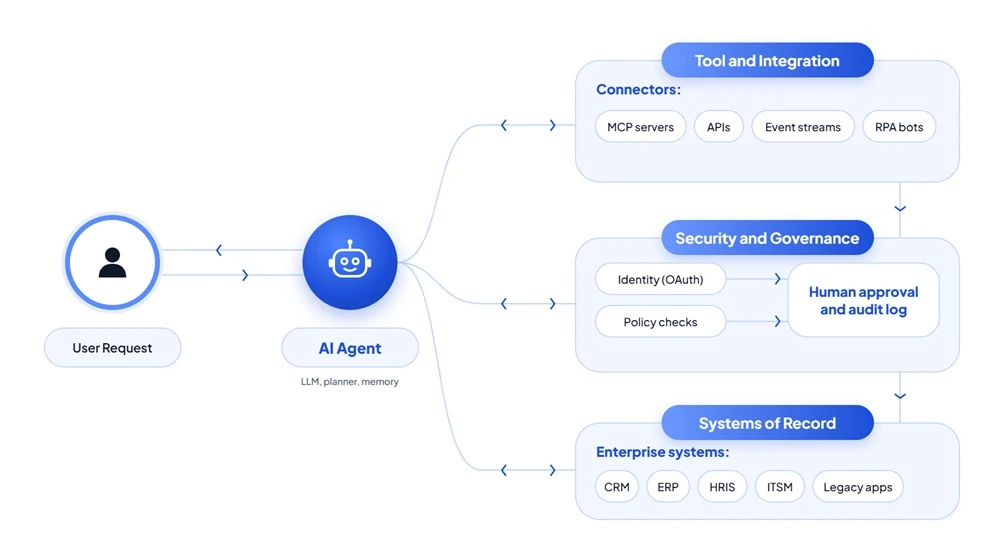
A production setup usually has five layers. Keeping them separate means you can swap a model, add a system or tighten a policy without rebuilding everything.
[DIAGRAM PLACEHOLDER: layered architecture, top to bottom: Users and channels, Agent and orchestration layer, Tool and integration layer, Security and governance layer, Systems of record]
- Users and channels: Web chat, Slack or Teams, email, voice, or another system calling the agent through an API.
- Agent and orchestration layer: The LLM, a planner that breaks goals into steps, short-term and long-term memory, and, in multi-agent setups, a supervisor that routes work between specialist agents.
- Tool and integration layer: MCP servers, an API gateway, event consumers, iPaaS connectors and RPA bots. This is where each system is wrapped as a tool with a clear contract.
- Security and governance layer: Identity and OAuth token exchange, policy checks before each tool call, rate limiting, secrets management, human approval queues and an audit log of every call and result.
- Systems of record: CRM, ERP, HRIS, ITSM, data warehouses, document stores and legacy applications.
The key design choice is that the agent never talks to a system of record directly. Every call passes through the integration and governance layers, which is where you enforce permissions and capture the audit trail.
How to Integrate AI Agents: Step-by-Step Process
1. Map the Workflow and Pick One Bounded Use Case
Choose a process with clear inputs, a measurable outcome and limited blast radius, such as order status and replacements rather than “all customer service”. Document every system touched, every decision point and who owns each step. Teams that are unsure where to start often begin with an AI automation consulting engagement to rank candidate workflows by value and risk.
2. Inventory Systems, APIs and Data Quality
For each system, record whether it has a REST or GraphQL API, an existing MCP server, webhooks, rate limits, and the auth methods it supports. Flag systems with no API and fields with poor data quality. A field that is empty half the time will mislead the agent more often than it helps.
3. Choose the Integration Method Per System
Apply the comparison table above system by system. A typical result: MCP for the CRM and knowledge base, webhooks for order events, a direct API for the payment provider, and RPA for one legacy portal.
4. Design Auth and Permissions
Use OAuth with on-behalf-of token exchange so the agent acts with the requesting user’s permissions, not a shared admin account. Scope each token to the minimum actions required. Store credentials in a secrets manager such as HashiCorp Vault or AWS Secrets Manager, rotate them, and never place them in prompts.
5. Build Tools the Model Can Use Correctly
Tool quality drives agent quality. Give each tool a specific name (get_open_orders_for_customer, not query), a description that says when to use it and when not to, and a strict input schema with enums and required fields. Return compact, structured results instead of raw API dumps. Teams with strong LLM development experience treat tool descriptions like prompts: versioned, reviewed and tested.
6. Add Guardrails and Human-in-the-Loop Approval
Classify every tool as read, low-risk write or high-risk write. Require human approval for high-risk actions such as refunds above a threshold, payroll changes or record deletion. Validate parameters outside the model, for example by rejecting a refund that exceeds the order value, regardless of what the agent requested.
7. Test and Evaluate
Build an evaluation set of realistic requests with expected tool calls. Measure whether the agent picks the right tool, passes correct parameters and recovers from errors. Add adversarial cases: missing data, ambiguous requests, API timeouts, rate-limit responses and injected instructions inside tool outputs. Load test the integration layer separately from the model.
8. Deploy in Phases with Monitoring and Rollback
Start in shadow mode, where the agent proposes actions and people execute them. Move to supervised mode with approvals, then to autonomous mode for low-risk actions only. Trace every run end to end, alert on error spikes and keep a kill switch that disables write tools without taking the agent offline.
Security and Governance for Integrated AI Agents
Once an agent can read sensitive records and change them, security moves from a review item to a design requirement.
Permission-Aware Access
The agent must never show a user data that user could not open directly. If a sales rep cannot see the HR folder in SharePoint, the agent answering that rep must not retrieve from it either. Enforce this at retrieval time with the user’s own token or with access control lists stored alongside your vector index, not with an instruction in the system prompt.
Prompt Injection Through Tool Outputs and MCP Servers
Prompt injection is ranked first in the OWASP Top 10 for LLM Applications. In integrated systems the dangerous version is indirect: hostile instructions hidden inside an email, a support ticket, a web page or a tool response that the agent reads. Security researchers have already shown a public GitHub issue being used to make an agent leak private repository data through an MCP server. Treat every tool output as untrusted data, limit which tools can run after reading external content, and require approval before data leaves your environment.
Audit Trails and Traceability
Log the user request, the model’s reasoning summary, each tool call with its parameters, each result and the final action, all tied to one trace ID. When a customer disputes a refund or an auditor asks why a record changed, you need to replay the full chain, not just the last API call.
Compliance Alignment
Map the data each tool touches to your obligations: GDPR for personal data of EU residents, HIPAA for protected health information, and the EU AI Act where an agent falls into a regulated use case such as employment decisions. Data residency, retention periods and the right to explanation all shape how you build the integration layer. Xicom runs this work under ISO/IEC 42001 (AI management), ISO/IEC 27001 and SOC 2 Type II certified processes.
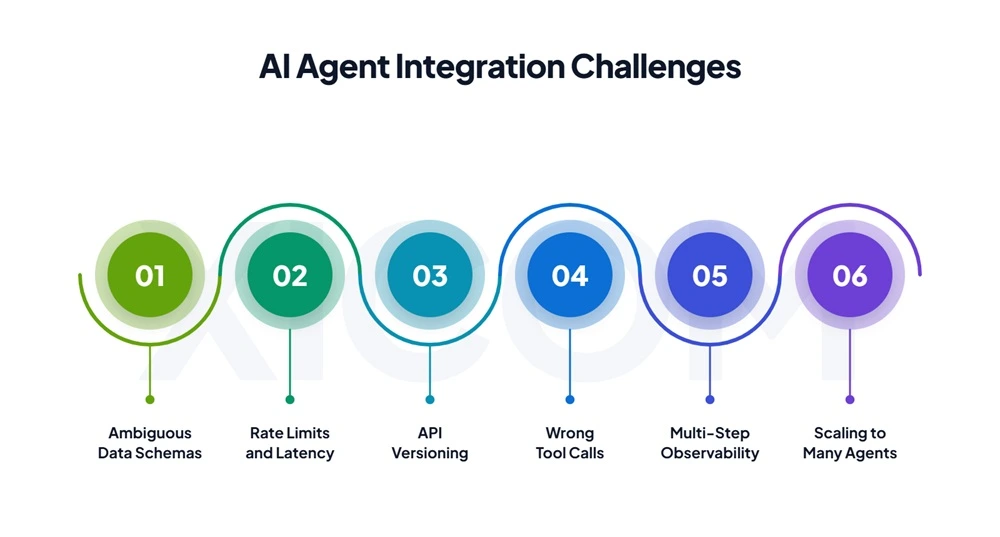
Common AI Agents Integration Challenges and How to Solve Them
Inconsistent or Ambiguous Data Schemas
Why it happens: The same word means different things across systems. A “status” field may mean employment status in the HRIS, account status in billing and deal stage in the CRM. The agent picks one meaning and acts on it, for example treating “inactive” as “terminated”.
Fix: Write field-level descriptions into tool schemas, map ambiguous fields to explicit enums, and add a semantic layer or data dictionary the agent can consult.
API Rate Limits and Latency
Why it happens: Agents call tools in bursts. One request can trigger a dozen lookups and hit vendor limits, while slow APIs stretch response times.
Fix: Batch requests, cache stable reference data, use event-driven updates instead of polling, and run independent tool calls in parallel with retry and backoff.
API Versioning and Breaking Changes
Why it happens: Vendors deprecate endpoints and rename fields. A tool that worked last month now returns errors or, worse, silently wrong data.
Fix: Pin API versions, run contract tests against each integration in CI, and keep the tool interface stable even when the underlying API changes.
Hallucinated or Wrong Tool Calls
Why it happens: Vague tool descriptions, overlapping tools and too many tools in one context lead the model to guess.
Fix: Keep each agent’s toolset small and focused, make descriptions precise, validate parameters server-side and return clear error messages the agent can correct from.
Observability Across Multi-Step Agent Runs
Why it happens: Traditional API monitoring shows each call in isolation, not the chain of reasoning that led to it.
Fix: Use distributed tracing (OpenTelemetry works well) across model calls and tool calls, and track business metrics such as task completion rate, escalation rate and cost per resolved task.
Scaling From One Agent to Many
Why it happens: Each new agent brings its own tools, credentials and permissions. Without a shared layer, you end up with duplicated connectors and inconsistent policies.
Fix: Centralize tools in a shared registry of approved MCP servers, apply one policy engine to every agent, and use a supervisor pattern or A2A for coordination. This is where agentic AI development practices, such as role separation and shared memory design, pay off.
AI Agent Integration Use Cases by Industry
Customer Support
- Systems: CRM, ticketing (Zendesk, ServiceNow), knowledge base, order management.
- What the agent does: Identifies the customer, checks order and case history, resolves routine requests such as replacements or plan changes, and escalates with a full summary when it cannot.
- Outcome: Faster resolution and fewer handoffs between tiers.
Insurance Claims
- Systems: Policy administration, document processing, fraud scoring, payments.
- What the agent does: Extracts details from claim documents, checks coverage against the policy, flags anomalies for the fraud team and prepares payment for adjuster approval.
- Outcome: Shorter claim cycle times, with adjusters focused on complex cases.
HR and Recruiting
- Systems: ATS, HRIS, Slack or Microsoft Teams, calendar.
- What the agent does: Matches applicants to open roles, schedules interviews, reminds interviewers, and handles onboarding and offboarding tasks such as access provisioning and revocation.
- Outcome: Less coordination work for HR teams and fewer missed steps during joiner and leaver processes.
Finance Operations
- Systems: ERP, accounting software, bank feeds, procurement.
- What the agent does: Matches invoices to purchase orders and receipts, reconciles payments against bank transactions, and routes exceptions to the right approver with context attached.
- Outcome: Faster month-end close and cleaner exception queues.
Manufacturing and Supply Chain
- Systems: ERP, inventory and warehouse management, supplier portals (often without APIs).
- What the agent does: Monitors stock against forecasts, checks supplier lead times, drafts purchase orders and alerts planners when a delay threatens production.
- Outcome: Earlier warning on shortages and less manual chasing of suppliers.
Build In-House or Work with an AI Agent Integration Partner?
| Factor | Build in-house | Work with a partner |
|---|---|---|
| Control | Full control over design and roadmap | Shared, governed by contract and handover |
| Speed to production | Slower if the team is new to agents | Faster with reusable connectors and patterns |
| Maintenance burden | Your team owns every API change | Can be shared through a support agreement |
| Security expertise | Must be built or hired | Brought in, ideally with certified processes |
| Long-term cost | Lower if agents are core IP and the team is stable | Lower when speed and avoided rework matter more |
Build in-house when agents are central to your product and you have engineers with LLM and integration experience. Bring in a partner for AI development services when you need production results quickly, face many legacy systems, or lack in-house security and evaluation skills. Many companies do both: a partner builds the foundation, and the internal team takes over.
What to look for in a partner:
- Production deployments, not only proofs of concept
- Hands-on experience with MCP, A2A and your core platforms (SAP, Salesforce, Workday, ServiceNow)
- A clear method for evaluation and tool-call testing
- Certified security and AI management processes
- Documentation and knowledge transfer built into the engagement
Conclusion
AI agents create value only when they can reach the systems where your data and decisions live. The right AI agent integration approach mixes methods: MCP for reusable tools, APIs and events for fixed workflows, A2A for collaboration between agents, and RPA where no API exists. What separates pilots from production is the layer around those connections: scoped permissions, approvals, evaluation and tracing. Start with one bounded workflow, prove it, then expand. As protocols mature, the companies that build this foundation now will add new agents in weeks rather than quarters.
FAQs
1. What is AI agent integration?
AI agent integration is the process of connecting AI agents to business applications, databases and other agents so they can retrieve real-time context and perform authorized actions. It turns an agent from a chat interface into a working part of a business process, such as resolving a support case across CRM, ERP and ticketing.
2. How do AI agents connect to enterprise systems?
AI agents connect through tools that wrap enterprise systems. Common methods are direct REST or GraphQL APIs with function calling, MCP servers, webhooks and event streams for real-time triggers, unified APIs or iPaaS connectors, and RPA or computer-use agents for systems without APIs. Most production setups combine several of these methods.
3. What is MCP and why does it matter for AI agent integration?
MCP (Model Context Protocol) is an open standard for connecting AI agents to tools and data. A connector built once as an MCP server can be reused by any MCP-compatible agent or model. That cuts duplicate integration work, but MCP servers must be vetted and scoped, since tool outputs can carry prompt injection.
4. How long does it take to integrate an AI agent with enterprise systems?
As a typical estimate, a single-system, read-only pilot takes 3 to 6 weeks. A multi-system production integration with write actions takes 2 to 4 months. An enterprise rollout with several agents and legacy systems can take 4 to 9 months. Data quality and security reviews usually decide where a project lands.
5. How much does AI agent integration cost?
Cost depends on scope. As a rough estimate, a focused pilot can start around $20,000 to $50,000. A multi-system production integration often falls between $60,000 and $150,000. Enterprise programs with many agents and legacy systems can exceed $150,000. Ongoing model usage, hosting and maintenance costs are additional.
6. Can AI agents integrate with legacy systems that have no API?
Yes. RPA bots and computer-use agents can operate legacy screens such as SAP GUI, mainframe terminals and vendor portals. They are slower and more fragile than APIs, so keep them to read-only or low-risk tasks, add human approval for financial actions, and consider wrapping the legacy system with an API over time.
7. How do you keep AI agent integrations secure?
Use OAuth with user-scoped tokens so the agent inherits each user’s permissions. Apply least-privilege scopes, store secrets in a vault, treat tool outputs as untrusted input, require human approval for high-risk actions, and log every tool call with a trace ID. Allow list approved MCP servers and test against the OWASP LLM risks.

Make your ideas turn into reality
With our AI & mobile app solutions
Explore related services
Based on this article's topic