How Much Does It Cost to Build a Hotel Booking App? Full Cost Breakdown
Hotel booking app development cost runs $21,000 to $200,000+ offshore. See costs by app type and phase, PMS integration, running costs and OTA savings.
Nov 2, 2026 App Development
Setting a phone alarm works fine for one pill a day. It falls apart when someone is managing five medications with different doses, timings, refill dates, and food restrictions, or when a caregiver is tracking all of that for an elderly parent from another city.
That gap is costly. A review in the Annals of Internal Medicine found that about half of medications for chronic disease are not taken as prescribed, and estimated that nonadherence causes roughly 125,000 deaths and at least 10% of hospitalizations in the US every year.
This is why medication management app development has become a priority for digital health startups, pharmacies, and care providers. This guide covers app types, must-have and AI features, integrations, compliance, the build process, and realistic cost ranges.
Quick Answer
Medication management app development is the process of building a mobile app (often with caregiver and provider dashboards) that stores a user’s medication list, schedules doses, sends reminders, logs intake, flags drug interactions, and alerts users before refills run out. A focused MVP typically takes 3 to 5 months and costs about $25,000 to $45,000 with an offshore team. Apps with pharmacy, EHR, wearable, and AI integrations usually range from $80,000 to $150,000 or more.
A medication management app is a digital tool that helps people take the right medication, at the right dose, at the right time, and keeps caregivers and clinicians informed. It goes well beyond a pill alarm: it understands the full regimen, tracks what was actually taken, and acts when something goes wrong.
How a typical app works:
The demand comes from a simple fact: more people are managing more medications, and the cost of getting it wrong falls on patients, providers, and payers alike.
| Signal | What the Data Says |
|---|---|
| Chronic disease burden | 6 in 10 US adults have a chronic disease, and 4 in 10 have two or more |
| Nonadherence | About 50% of chronic disease medications are not taken as prescribed, and 20% to 30% of prescriptions are never filled |
| Cost of nonadherence | An estimated $100 billion to $289 billion a year in avoidable US healthcare costs |
| Market growth | The medication management system market is projected to grow from $3.47 billion to $5.87 billion by 2030, at about 11% a year |
Category leaders prove that users will adopt these apps at scale. Medisafe, one of the best-known apps in the space, says it helps millions of people stay on track by combining reminders, interaction warnings, caregiver alerts (“Medfriends”), and wearable support. The opportunity for new products lies in serving groups the big apps underserve: specific conditions, older adults, caregivers, pharmacies, and clinics.
Before you develop a medication management app, pick the model. Each type serves a different user, needs different integrations, and carries a different compliance scope.
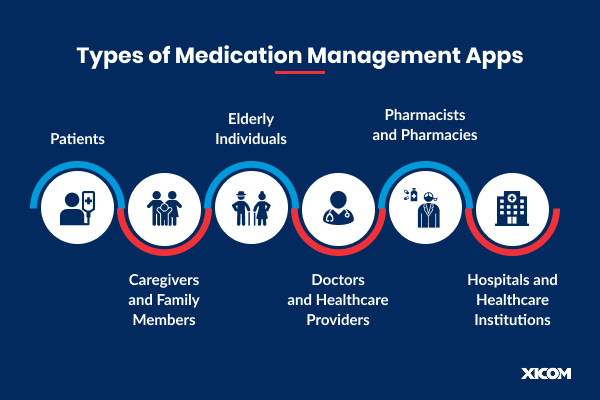
| App Type | Who It Serves | Core Focus | Real-World Examples |
|---|---|---|---|
| Pill reminder and tracker | Individuals on short or long-term medication | Schedules, reminders, intake logs, refill alerts | Medisafe, MyTherapy |
| Caregiver app | Parents, adult children, professional caregivers | Multiple profiles, remote monitoring, missed-dose alerts | Caregiver modes in leading apps |
| Senior-friendly app | Older adults with complex regimens | Large UI, voice reminders, simplified flows | Voice-first and tablet-based tools |
| Condition-specific app | Diabetes, hypertension, epilepsy, mental health, transplant patients | Medication plus vitals, symptoms, and care team messaging | Disease management platforms |
| Smart device companion | Homes using connected pill dispensers | Bluetooth or Wi-Fi sync, automatic intake logging | Hero, MedMinder |
| Pharmacy-integrated app | Pharmacy chains and their customers | Refills, prescription transfers, delivery tracking | Retail pharmacy apps |
| Clinical medication system | Hospitals, clinics, long-term care | eMAR, reconciliation, adherence dashboards, EHR sync | Enterprise eMAR tools |
If you are a startup, a niche such as a caregiver app or a condition-specific tracker is usually the fastest route to traction. Pharmacies and providers often get faster ROI from a branded app that plugs into the systems they already run.
Also Read: Medical Software Development
Most apps serve more than one audience, and each one judges the product differently. Design for the primary user first, then add views for the others.

Good medication apps feel simple because every feature feeds the next one. Here is the core feature set for an MVP and the role each piece plays.
| Feature | Role in the App |
|---|---|
| Secure sign-up and profiles | Biometric or two-factor login, plus profiles for age, conditions, allergies, and family members. |
| Medication entry and scanning | Add drugs by search, barcode, or label scan, auto-filled from a certified drug database. |
| Flexible scheduling engine | Handles complex patterns such as tapering doses, every-other-day, as-needed, and food timing. |
| Reliable reminders | Push, SMS, or voice alerts that fire on time across sleep mode, low battery, and time-zone changes. |
| Dose logging | One-tap taken, skipped, or snoozed, with a visual daily and weekly timeline. |
| Drug interaction warnings | Flags harmful combinations, duplicate therapies, and allergy conflicts. |
| Refill alerts | Counts remaining supply and reminds users, or pharmacies, before it runs out. |
| Caregiver access | Permission-based sharing with missed-dose alerts and remote dose confirmation. |
| Symptom and vitals log | Tracks side effects, mood, blood pressure, or glucose, manually or from wearables. |
| Adherence reports | Exportable PDF summaries for doctors and pharmacists. |
| Privacy and security controls | Encryption, consent management, role-based access, and audit logs. |
Pay special attention to reminder reliability. If notifications fail even occasionally, users stop trusting the app, and medication tracking app development lives or dies on that trust.
Once the core works flawlessly, these features turn a reminder tool into a full adherence platform.
Machine learning studies when each user actually takes doses and shifts reminder timing, channel, and tone to match real routines. Our machine learning development team builds these models on anonymized usage data.
Models flag users whose patterns suggest they are about to drop off, so caregivers or care teams can step in early.
A chat or voice assistant answers questions like “Can I take this with food?” using approved drug information, and summarizes adherence for doctor visits. With generative AI development services, responses can be grounded in your drug database with clear guardrails.
Computer vision identifies pills by shape, color, and imprint, or reads prescription labels to auto-fill medication details and reduce entry errors.
Connect with Apple Health, Health Connect, smartwatches, and Bluetooth pill dispensers to log intake automatically and correlate medication with vitals.
Let users consult doctors in-app and have new prescriptions flow directly into their schedule without manual entry.
Streaks, progress milestones, and encouraging messages help build the daily habit, especially for younger users and long-term therapies.
A note on regulation: features that only track medications and send user-configured reminders are among the low-risk functions where the FDA says it intends to exercise enforcement discretion (FDA). Features that recommend specific dose changes or treatment decisions can move your app into regulated medical device territory, so plan those with regulatory advice. Working with experienced AI developers helps you get the value of AI without crossing that line by accident.
The accuracy of a medication app depends on its data sources. Never let users rely on free-text drug names alone; connect to trusted databases and health systems.
| Layer | Common Choices |
|---|---|
| Mobile apps | Swift (iOS), Kotlin (Android), or Flutter / React Native for cross-platform |
| Backend | Node.js, Python, Java, or .NET with PostgreSQL and Redis |
| Drug data | RxNorm and openFDA (free), or licensed databases such as First Databank and Medi-Span for interaction checks |
| EHR interoperability | HL7 FHIR R4 (MedicationRequest, MedicationStatement), SMART on FHIR |
| Pharmacy and e-prescribing | Pharmacy APIs and NCPDP SCRIPT-based e-prescribing networks |
| Health data and devices | Apple HealthKit, Health Connect (Android), BLE for smart dispensers |
| Notifications | APNs, Firebase Cloud Messaging, SMS and voice gateways |
| Cloud | AWS, Microsoft Azure, or Google Cloud, using HIPAA-eligible services under a BAA |
Cross-platform frameworks suit most MVPs because one codebase covers iOS and Android. Native code is worth it when you rely heavily on background notifications, Bluetooth devices, or platform accessibility features. A seasoned mobile app development team can help you choose based on your feature list rather than habit.
Medication lists reveal a lot about a person’s health, so privacy has to be designed in from the first sprint. Which rules apply depends on who you are and who you serve.
On the technical side, use encryption in transit and at rest, multi-factor and biometric login, role-based access for caregivers and clinicians, consent records, and analytics tools that never receive identifiable health data.
Whether you plan to develop a medication tracker app for consumers or a clinical tool for care teams, the process follows the same path.
Define your primary user, care setting, and business model. Study apps like Medisafe and MyTherapy, read their reviews for pain points, and interview real patients and caregivers.
List every type of data you will collect, where it flows, and which regulations apply. Decide early whether any feature could be considered a medical device.
Cut the feature list to one complete journey: add medication, schedule, remind, log, and alert a caregiver. Everything else goes on the roadmap.
Design for the least tech-savvy user you expect. Use large tap targets, clear color coding, and simple language, then test the prototype with older adults before writing code.
Choose the tech stack, drug database, notification strategy, and cloud setup. Plan FHIR, pharmacy, and wearable integrations even if they ship later.
Build in two-week sprints with a working demo each time. If you need extra capacity, you can hire mobile app developers or hire software developers to extend your in-house team.
Test reminders across devices, OS versions, sleep modes, and time zones. Add security testing, accessibility audits, and a HIPAA or GDPR review before launch.
Release to the App Store and Google Play, then track retention, adherence rates, and reminder delivery. Ship improvements based on real usage and keep drug data current.
Medication management app development cost depends on scope, integrations, and where your team is based. The ranges below cover the patient app, caregiver features, backend, and admin tools.
| Scope | What Is Included | Timeline | Offshore Team (e.g., India) | US / Western Europe Team |
|---|---|---|---|---|
| MVP | Cross-platform app, medication list, scheduling, reminders, dose logging, refill alerts, basic caregiver sharing | 3 to 5 months | $25,000 to $45,000 | $75,000 to $130,000 |
| Mid-level app | MVP plus interaction checks via a drug database, symptom and vitals logs, reports, wearable sync | 5 to 7 months | $45,000 to $80,000 | $130,000 to $220,000 |
| Advanced platform | Pharmacy and EHR integration, clinician dashboard, smart dispensers, AI features | 7 to 12 months | $80,000 to $150,000+ | $220,000+ |
Ongoing costs to budget for: licensed drug database fees, SMS and voice reminder charges, HIPAA-eligible hosting, security audits, and maintenance, typically 15% to 20% of the initial build each year. Treat these numbers as ballpark ranges and get a scoped estimate once your feature list is clear.
Also Read: Doctor Appointment App Development
| Challenge | Why It Matters | How to Solve It |
|---|---|---|
| Complex schedules | Tapering doses, cycles, and as-needed drugs break simple timers | A rules-based scheduling engine built and tested for edge cases |
| Unreliable notifications | Battery savers and OS limits can silence reminders | Native notification handling, backup SMS or voice, and delivery monitoring |
| Data entry errors | A wrong dose typed once repeats every day | Barcode and label scanning, validated drug data, and confirmation screens |
| Alert fatigue | Too many pings make users mute the app | Smart grouping, adaptive timing, and user control over channels |
| Low engagement | Users stop logging after the first few weeks | Streaks, progress reports, caregiver support, and short onboarding |
| Accessibility for older adults | Small fonts and dense screens block your core users | WCAG-based design, voice reminders, and usability tests with seniors |
| Privacy and compliance | Health data leaks destroy trust and invite penalties | Privacy-by-design, encryption, BAAs, and regular security audits |
Xicom brings more than 20 years of software delivery, 750+ clients across 50+ countries, and 1,800+ completed projects to every healthcare product we build. Our healthcare app development teams cover the full journey:
People do not need another alarm. They need an app that understands their full regimen, reminds them reliably, catches mistakes, and keeps the people who care for them in the loop. Start with a focused MVP, get reminders and accessibility right, connect to trusted drug data, and add AI once the foundation is solid.
A basic MVP typically costs $25,000 to $45,000 with an offshore team, or $75,000 to $130,000 with a US-based team. Apps with drug database interaction checks, wearables, pharmacy or EHR integration, and AI features range from about $80,000 to $220,000 or more.
An MVP usually takes 3 to 5 months. A mid-level app with interaction checks, reports, and wearable sync takes 5 to 7 months, and an advanced platform with pharmacy and EHR integration can take 7 to 12 months.
Core features include secure profiles, medication entry and scanning, flexible scheduling, reliable reminders, dose logging, drug interaction warnings, refill alerts, caregiver access, symptom tracking, adherence reports, and strong privacy controls.
It does if you build it for, or on behalf of, a healthcare provider, health plan, or their business associate and it handles protected health information. Many consumer apps fall outside HIPAA but are still covered by the FTC Health Breach Notification Rule, and apps serving EU users must follow GDPR.
Apps that only track medications and send user-configured reminders are generally treated by the FDA as low risk, with enforcement discretion. Apps that recommend dose changes or treatment decisions may be regulated as medical devices, so get regulatory advice before building those features.
Free sources include RxNorm from the National Library of Medicine and openFDA. For detailed drug interaction checks, many apps license commercial databases such as First Databank or Medi-Span.
Yes. Apps can sync with Apple HealthKit, Health Connect, smartwatches, and Bluetooth pill dispensers, and connect to EHRs through HL7 FHIR APIs to import prescriptions and share adherence data with care teams.
Common models include premium subscriptions, B2B licensing to pharmacies, clinics, and insurers, white-label versions for healthcare brands, and partnerships with pharma patient support programs, as long as user health data is never sold.

Based on this article's topic
Hotel booking app development cost runs $21,000 to $200,000+ offshore. See costs by app type and phase, PMS integration, running costs and OTA savings.
Marketplace app development cost ranges from $40,000 to $300,000+. See costs by tier and feature, AI add-ons, payment fees, and how to build an app like Amazon.
Explore top mobile app development trends for 2027, from on-device AI and in-app agents to passkeys, foldables and cross-platform builds, with current data.