Sep 18, 2026 Artificial Intelligence
Key Takeaways
- AI adoption across HR functions reached 39% by early 2026, up from 26% in 2024, according to SHRM’s State of AI in HR 2026. A Gartner survey of HR leaders found that 88% hadn’t yet seen significant business value from their AI tools, and the gap usually comes down to scope, not the technology.
- IBM’s internal AskHR assistant handled 11.5 million employee interactions in 2024 with a 94% containment rate, cutting manager transaction time by 75%. It is one of the most thoroughly documented conversational AI HR deployments publicly available.
- The highest-ROI starting point is almost always the HR helpdesk. Leave, payroll, and benefits questions typically make up the bulk of ticket volume and need no human judgment to resolve.
- Recruiting and performance-related use cases carry real compliance weight. The EU AI Act classifies employment AI as high-risk, and any deployment touching hiring or worker decisions needs governance review before launch.
Most HR teams already know their helpdesk is overloaded with the same handful of questions on repeat: how many leave days are left, when payroll runs, how to update a benefits election. None of it needs a person to answer. It needs a system that already knows the answer and can say it in plain language. That’s the entire premise behind conversational AI in HR, and it’s why the function is one of the fastest-growing areas of enterprise AI adoption right now.
The bigger question for most HR and IT leaders isn’t whether to use Conversational AI in Human Resources. It’s where to draw the line between what should be automated and what still genuinely needs a human, and how to build or buy something that actually integrates with the systems already in place.
This guide covers how conversational AI in HR actually works, where it delivers real value, where it commonly falls short, and how to approach implementation without over-promising what a chatbot can do.
Why Conversational AI in HR Is Accelerating Now
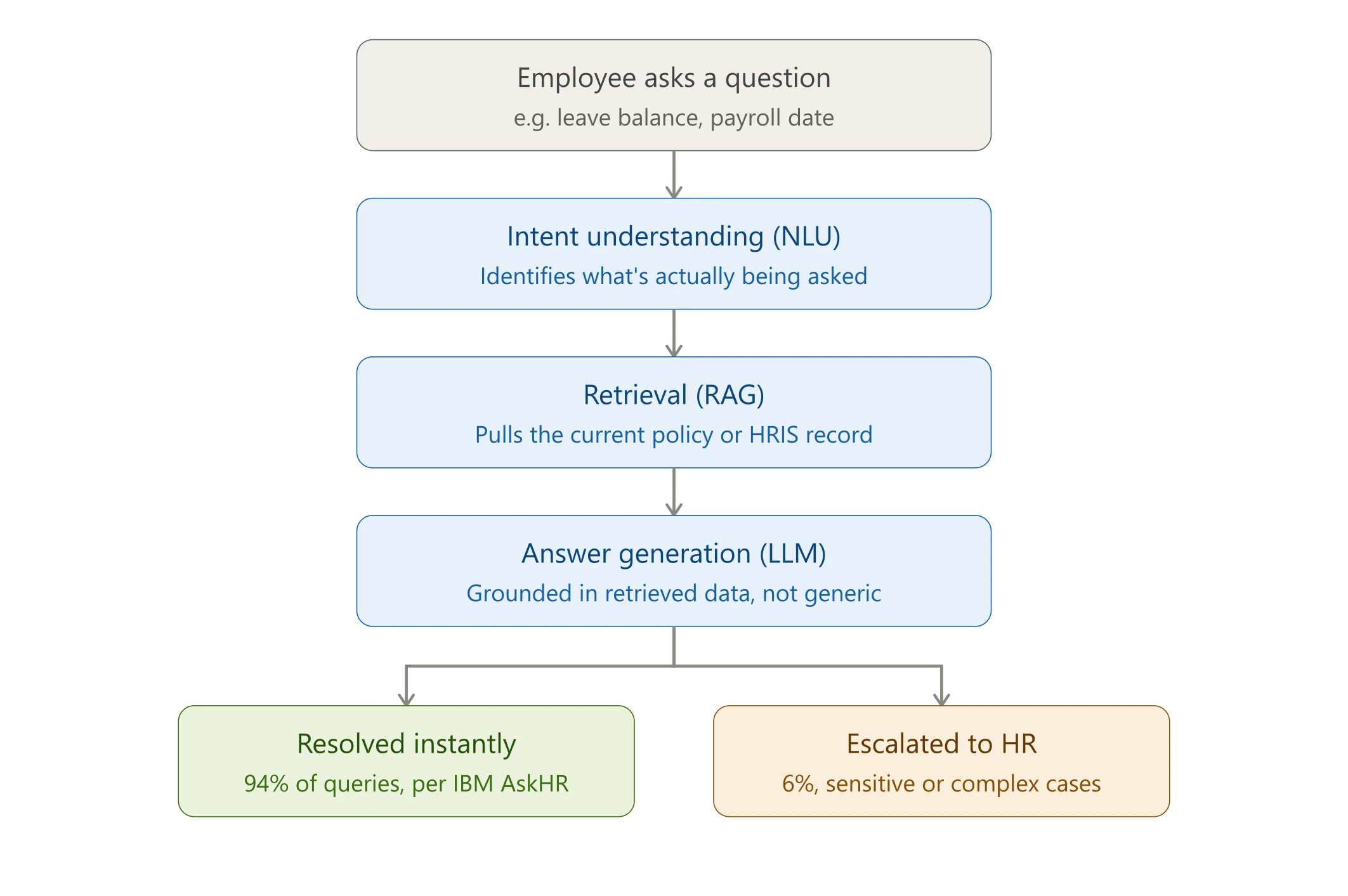
Conversational AI in Human Resources refers to AI systems, built on NLP and increasingly on large language models, that let employees, managers, and candidates interact with HR systems in plain language instead of forms or ticket queues. It’s a meaningful step beyond the rule-based HR chatbot most people picture. Instead of matching keywords to a canned response, it understands intent, holds context across a conversation, and, when paired with retrieval-augmented generation (RAG), pulls the actual current policy or record before answering, rather than generating a generic summary from memory.
The adoption data reflects a function under real pressure to modernize. SHRM’s State of AI in HR 2026, based on 1,908 HR professionals, found AI adoption across HR functions at 39%, up from 26% in 2024, with 87% of adopters reporting efficiency gains and 75% reporting improved work quality. Deloitte’s 2025 Global Human Capital Trends report, surveying nearly 13,000 business and HR leaders across 93 countries, found that 54% of workers and leaders are concerned about blurred lines between human and AI-driven work, a signal that adoption is outpacing internal clarity on how these tools should be used.
A Gartner survey of HR leaders, presented at Gartner’s HR Symposium in October 2025, found that 88% hadn’t yet seen significant business value from their AI tools. Gartner’s own analysis points to a specific cause: AI tools deployed without integrating them into actual daily workflows, rather than a failure of the underlying technology.
The clearest illustration of what “done properly” looks like is IBM’s own AskHR system. IBM consolidated 25 separate internal HR bots into a single assistant, then removed the fallback of calling an HR business partner directly to force adoption. By 2024, AskHR was handling more than 11.5 million interactions a year with a 94% containment rate, meaning only 6% of questions needed escalation to a human. Internal satisfaction rose to +74, up from -35 in its early rule-based days, and manager transactions were completed 75% faster than before. It has since evolved into an agentic system on IBM’s watsonx Orchestrate platform, coordinating multiple task-specific agents rather than answering single questions in isolation. The value came from consolidation and deep system integration, not from the chatbot interface itself.
7 Core Use Cases of Conversational AI for HR Departments
1. HR Helpdesk and Employee Self-Service
This is the anchor use case and, for most organizations, the first one built, because it’s the highest-volume, lowest-risk starting point. Employees ask about policies, benefits enrollment windows, payroll dates, document requests, or how to update personal information, and the assistant resolves it instantly instead of sitting in a ticket queue for hours or days.
What separates a genuinely useful helpdesk assistant from a glorified FAQ page is containment rate: the percentage of queries the system resolves without human involvement, plus clear, visible escalation for the rest. A well-scoped deployment doesn’t try to answer everything. It answers deterministic questions confidently and routes ambiguous or sensitive ones to a person immediately.
Real-World Implementation: IBM’s AskHR consolidated 25 internal HR bots into one assistant and removed the fallback of calling an HR business partner directly. By 2024 it was handling 11.5 million interactions annually with a 94% containment rate and an internal satisfaction score of +74.
2. Recruitment and Candidate Screening
Conversational AI handles the front end of the hiring funnel: answering applicant questions about the role, running structured pre-screening conversations, coordinating interview scheduling, and sending status updates, which is where most candidate drop-off actually happens.
This is also the use case with the most direct compliance exposure. The EU AI Act’s Annex III classifies AI used for recruitment, candidate filtering, and evaluation as high-risk, with obligations around transparency, bias testing, and human oversight. Any deployment here needs legal and governance sign-off scoped specifically to hiring.
3. Onboarding
New hires generate a disproportionate volume of small, repetitive questions in their first two weeks: where to find the benefits portal, how to submit an expense report, who to contact for laptop setup, when orientation runs. A conversational assistant embedded in onboarding absorbs this volume before it reaches the general helpdesk queue, and can proactively prompt new hires at day one, week one, and thirty days in.
If the same onboarding question keeps coming up across cohorts, that’s a documentation gap worth fixing at the source, not just a query worth automating.
4. Leave, Payroll, and Benefits Queries
The highest-volume, lowest-complexity category, and the one with the clearest, fastest ROI, since it’s almost entirely deterministic data lookup: “how many PTO days do I have,” “when does open enrollment close,” “which health plan covers dependents.” This category depends most heavily on deep HRIS integration. A generic policy-FAQ bot can describe leave policy in general terms, but only a system connected to the actual HRIS can tell an employee their specific, current balance.
5. Performance and Feedback Collection
Conversational interfaces are increasingly used for structured feedback collection: pulse surveys, 360 review inputs, exit interviews. A conversational format tends to produce more complete, candid responses than a static form, and it lets HR run shorter, more frequent check-ins without the fatigue that comes with longer surveys.
6. Attrition and Sentiment Signals
By analyzing patterns across employee conversations, query frequency, sentiment shifts, recurring topics, some platforms surface early attrition-risk signals to HR business partners. This is genuinely valuable, but it also requires careful, disclosed design. Aggregate-level pattern detection is very different from individual-level profiling of a named employee’s conversations, and the second approach erodes trust fast once discovered. This use case needs the most explicit communication about what’s being analyzed and why.
7. Learning and Development Assistance
Recommending relevant training based on role, tenure, or skill gaps, and answering logistics questions about internal courses or renewal deadlines. This extends the helpdesk pattern into a more consultative direction, mapping an employee’s stated career interest to actual internal course catalogs rather than just answering when a course starts.
Real-World Implementation: Unilever built an internal HR chatbot called “Unabot,” designed to tailor responses based on an employee’s location and seniority rather than giving every user the same generic answer. It launched in the Philippines and expanded to 36 countries, a useful reference point for any organization running HR conversational AI across multiple labor law jurisdictions, a real consideration for teams operating across the US, UK, India, and UAE.
Also Read: Conversational AI in Insurance
Benefits of Conversational AI for HR
Faster Resolution and Higher Employee Satisfaction
Employees get answers in seconds instead of waiting on a ticket queue. IBM’s internal satisfaction score for AskHR rose to +74 from -35 in its early days, not because policies changed, but because the experience of getting an answer did. SHRM’s 2026 data shows 75% of organizations that adopted AI in HR reported improved work quality, not just faster processing.
Reduced Administrative Burden on HR Generalists
Every repetitive query a conversational assistant resolves is time a generalist doesn’t spend on it, time that can go toward retention conversations, workforce planning, or manager coaching. IBM’s automations let managers complete HR transactions 75% faster than before, freeing HR business partners from transactional work entirely.
Cost Efficiency at Scale
Once integration is done properly, cost per interaction drops significantly compared to a human-staffed helpdesk, since the marginal cost of answering the ten-thousandth identical leave-balance question is close to zero. The upfront integration work, connecting the assistant to HRIS, ATS, and ticketing systems, is the real investment; the AI layer itself is comparatively inexpensive. SHRM found 87% of adopters saw efficiency improvements, which tracks with this pattern: gains show up after integration, not immediately at launch.
Consistency and Reduced Compliance Risk
Every employee who asks the same policy question gets the same, current answer, an improvement over relying on generalists’ memory of policy details, which drifts as policies update and staff turn over. Inconsistent verbal guidance on things like leave eligibility is a common source of employee disputes and, in regulated contexts, real compliance exposure.
Structured Visibility into HR Communication Gaps
A spike in questions about a specific benefit usually signals a communication gap in how it was rolled out, not a policy problem. That’s a cheaper insight to act on than discovering it through an engagement survey months later. Teams that treat query logs as an ongoing feedback channel get more value from the same deployment.
24/7 Global Availability
For organizations with distributed teams, genuinely relevant across the US, UK, India, and UAE, a conversational assistant removes the time-zone dependency that comes with a helpdesk staffed in one region. An employee in Dubai doesn’t have to wait for a US-hours HR team to wake up to get a same-day answer.
Conversational AI HR Helpdesk vs. Traditional Ticketing
| Factor | Traditional HR Ticketing | Conversational AI HR Helpdesk |
|---|---|---|
| Response time | Hours to days | Immediate for resolved queries |
| Scalability | Linear with headcount | Handles volume spikes without added staff |
| Query resolution | Manual review every time | Automated for repetitive queries, escalated for complex ones |
| Consistency | Varies by agent | Consistent, policy-grounded answers |
| Data capture | Manual tagging | Automatic categorization and trend analysis |
| Best for | Complex, judgment-based cases | High-volume, repetitive queries |
Risks and Limitations HR Leaders Should Plan For
Being direct about these matters more than listing benefits, because this is where most deployments underdeliver.
- Accuracy and hallucination risk: An LLM without proper RAG grounding can generate a plausible but wrong answer about eligibility, pay, or leave, and in HR that carries legal weight, not just a bad UX outcome.
- Data privacy and compliance: HR data is among the most sensitive data an organization holds. Deployment needs legal review covering GDPR, relevant US state privacy laws, and sector-specific rules in markets like the UAE and India, before launch.
- Bias in AI-assisted decisions: Especially in recruiting, the exact area the EU AI Act singles out as high-risk.
- Employee trust: Sentiment or attrition-signal analysis deployed without disclosure erodes trust fast once discovered.
- Over-automation: Routing every query, including sensitive ones like harassment complaints, to a bot rather than a human is a design failure, not a feature.
None of this argues against adoption. It argues for treating conversational AI in HR as a governed system, not a plug-and-play chatbot.
Implementation Strategy: Getting Started With Conversational AI in HR
The gap Gartner identified, 88% of HR leaders not seeing significant value, is rarely a technology problem. It’s almost always a scoping and integration problem.
Assessment and Planning
Start with a genuine audit of HR ticket volume by category, not an assumption about what employees ask most. Pull actual helpdesk data and categorize it: how much is leave and payroll, how much is benefits, how much genuinely needs judgment. This usually reveals that the “obvious” starting point, often recruiting because it’s the most visible AI use case in the market, isn’t actually where the highest-volume, lowest-risk opportunity sits. Run stakeholder interviews with HR generalists, employees, and IT before finalizing scope.
Pilot Program Development
Start narrow. Leave balances and policy FAQs are the common entry point because they’re low-risk, high-frequency, and easy to measure. Resist launching with recruiting or performance-review use cases first; they’re higher-visibility but harder to validate quickly. Set explicit success metrics before launch: containment rate, resolution time, employee satisfaction. Document what breaks during the pilot as carefully as what works.
Integration and Scaling
Plan integration with actual systems of record from the start, HRIS, ATS, payroll, ITSM, rather than launching a standalone FAQ bot and connecting it later. A disconnected assistant that only answers generic policy questions is a much smaller thing than one that can tell an employee their specific leave balance. Expand use case by use case, not all at once. Once the helpdesk use case is stable, extend into onboarding or benefits guidance before touching recruiting or performance, since those carry more governance weight. Build a maintenance cycle into the plan from day one.
Also Read: Conversational AI in Healthcare
Overcoming Implementation Challenges and Considerations
Even a well-scoped deployment runs into predictable friction. Planning for it upfront separates a sustained rollout from a pilot that quietly gets abandoned.
Privacy, Security, and Compliance
Conversational AI systems need clear, documented boundaries around data collection, storage, and usage before launch, not as an afterthought. This means legal review scoped to actual jurisdictions: GDPR in the EU and UK, relevant state-level privacy laws in the US, and sector-specific rules in India and the UAE. For any use case touching hiring or performance decisions, bias testing and human-oversight documentation need to be built into governance from the start, given the EU AI Act’s high-risk classification for employment AI. Employees and candidates should have a clear way to understand how the system reached an answer affecting them, and a real channel to contest it.
Change Management and Adoption
A technically sound assistant still fails if employees don’t trust it or don’t know it exists. Rollouts need genuine communication about what the system does, what it doesn’t, and when a human is still the right path. Positioning the assistant as removing wait time on routine questions, so HR can focus on what actually needs a person, tends to land better than positioning it as a replacement, largely because it’s also true. Train HR staff to work alongside the system, with visibility into escalated conversations so context isn’t lost at handoff.
Quality assurance and continuous improvement
Set up ongoing monitoring for accuracy, not just uptime. An assistant that answers confidently but incorrectly on a policy question is worse than one that says it isn’t sure and connects the employee to someone. Catching that drift requires regular audits against current policy documents, not a one-time check at launch. Build a feedback loop employees can actually use, a simple thumbs up or down is usually enough, and route negative feedback into a review queue that gets checked. Someone needs to own updating the underlying policy documents the assistant retrieves from, or the system will confidently serve outdated answers indefinitely.
Build vs. Buy: Choosing the Right Approach
Off-the-shelf platforms, embedded in HRIS suites like Workday or SAP SuccessFactors, or standalone tools like Moveworks and Leena AI, get you to a working helpdesk assistant faster, and make sense when your use case is close to their standard configuration.
A custom-built approach makes more sense when you need deep integration with proprietary or legacy systems standard connectors don’t support well, your policy structure spans multiple countries with different labor law regimes, you want the assistant to extend into agentic workflows eventually, or data residency requirements rule out sending HR data to a third-party platform.
There’s no universally correct answer. It’s a genuine tradeoff between time-to-value and long-term flexibility.
The Future: Agentic AI in HR
The current generation of conversational AI in HR mostly answers questions. The next phase, visible already in systems like IBM’s AskHR on watsonx Orchestrate, is agentic: assistants that don’t just respond but complete multi-step tasks end to end, coordinating across systems without a human touching each step. This shifts the AI from an information layer to an execution layer, which raises the stakes on governance and testing considerably, but represents the larger efficiency gain HR teams are ultimately after.
How Xicom Helps Build Conversational AI for HR
Xicom helps organizations think through and build conversational and agentic AI systems on top of their existing HR and enterprise infrastructure, from HRIS-integrated helpdesk assistants to RAG-grounded knowledge systems and custom AI agents built for specific HR workflows. Whether you’re weighing options through conversational AI consulting, evaluating an in-house build, or looking to bring in an AI development team to extend an existing chatbot into agentic workflows, that’s a scoping conversation worth having before committing to a platform.
FAQs
1. What is conversational AI in HR?
Conversational AI in HR is AI-powered software, typically combining NLP and LLMs, that lets employees and candidates interact with HR systems in natural language to get policy answers, check benefits, or complete HR tasks instead of navigating portals or submitting tickets.
2. How is conversational AI different from a regular HR chatbot?
Traditional chatbots follow fixed decision trees and break when questions don’t match expected phrasing. Conversational AI understands intent and context, and when paired with RAG, retrieves accurate, up-to-date information from actual HR systems instead of giving generic scripted answers.
3. What are the most common use cases for conversational AI in HR departments?
The most common starting points are HR helpdesk automation for policy and benefits questions, onboarding support, and leave and payroll queries. More advanced deployments extend into recruitment screening, performance feedback collection, and attrition-risk signaling.
4. Is conversational AI in Human Resources (HR) secure and compliant with data privacy regulations?
It can be, but compliance isn’t automatic. HR data is highly sensitive, and any deployment needs a legal and governance review covering data retention, regional privacy laws, and, for recruiting and performance-related use cases, the EU AI Act’s high-risk classification for employment AI.
5. Can conversational AI replace HR staff?
No. It’s designed to absorb repetitive, low-complexity queries so HR staff can focus on judgment-based work like employee relations, retention strategy, and complex case management. The realistic model is augmentation, not replacement.
6. How much does it cost to implement a conversational AI HR helpdesk?
Cost depends heavily on scope. An off-the-shelf tool for basic FAQ automation costs far less than a custom-built system integrated across HRIS, ATS, and payroll platforms. The integration work, not the AI model itself, is usually the larger cost driver.

Make your ideas turn into reality
With our AI & mobile app solutions
Explore related services
Based on this article's topic