Human-in-the-Loop AI Agents: Architecture & Use Cases
How human-in-the-loop AI agents work: when to require approval, the interrupt-and-resume architecture, real use cases and the mistakes that weaken oversight.
Nov 13, 2026 Artificial Intelligence
AI agent guardrails are what stand between a helpful agent and an expensive incident. A chatbot that says something wrong produces a bad answer; an agent that does something wrong can refund the wrong customer, email a confidential file or delete records. Because agents read untrusted content, call tools and act on real systems, a single content filter on the model’s reply is not enough. This guide explains how to design guardrails in layers, from permissions and input checks to tool limits, approvals and runtime monitoring, which tools to use for each layer, and how to keep guardrails fast, accurate and maintainable.
AI agent guardrails are the policies, checks and permissions that limit what an agent can read, say and do, so its behavior stays within what the business has approved. They include filters on what goes into and comes out of the model, but also rules on which tools the agent may call, with which arguments, how often and with whose authority.
Think of guardrails as the agent’s operating boundaries. The model decides what it wants to do next; guardrails decide whether it is allowed to. That split matters because a language model can be persuaded, confused or simply wrong, while a permission check in code behaves the same way every time.
Guardrails serve two goals that are easy to blur together:
LLM guardrails were built for chat: check the user’s prompt, check the model’s reply, block anything harmful. Agents break that model in three ways.
The OWASP top 10 for LLM applications names this risk directly as Excessive Agency, and traces it to three root causes: excessive functionality, excessive permissions and excessive autonomy. Each one maps to a guardrail layer below. That is why AI agent security is as much an access-control problem as a content-moderation one.
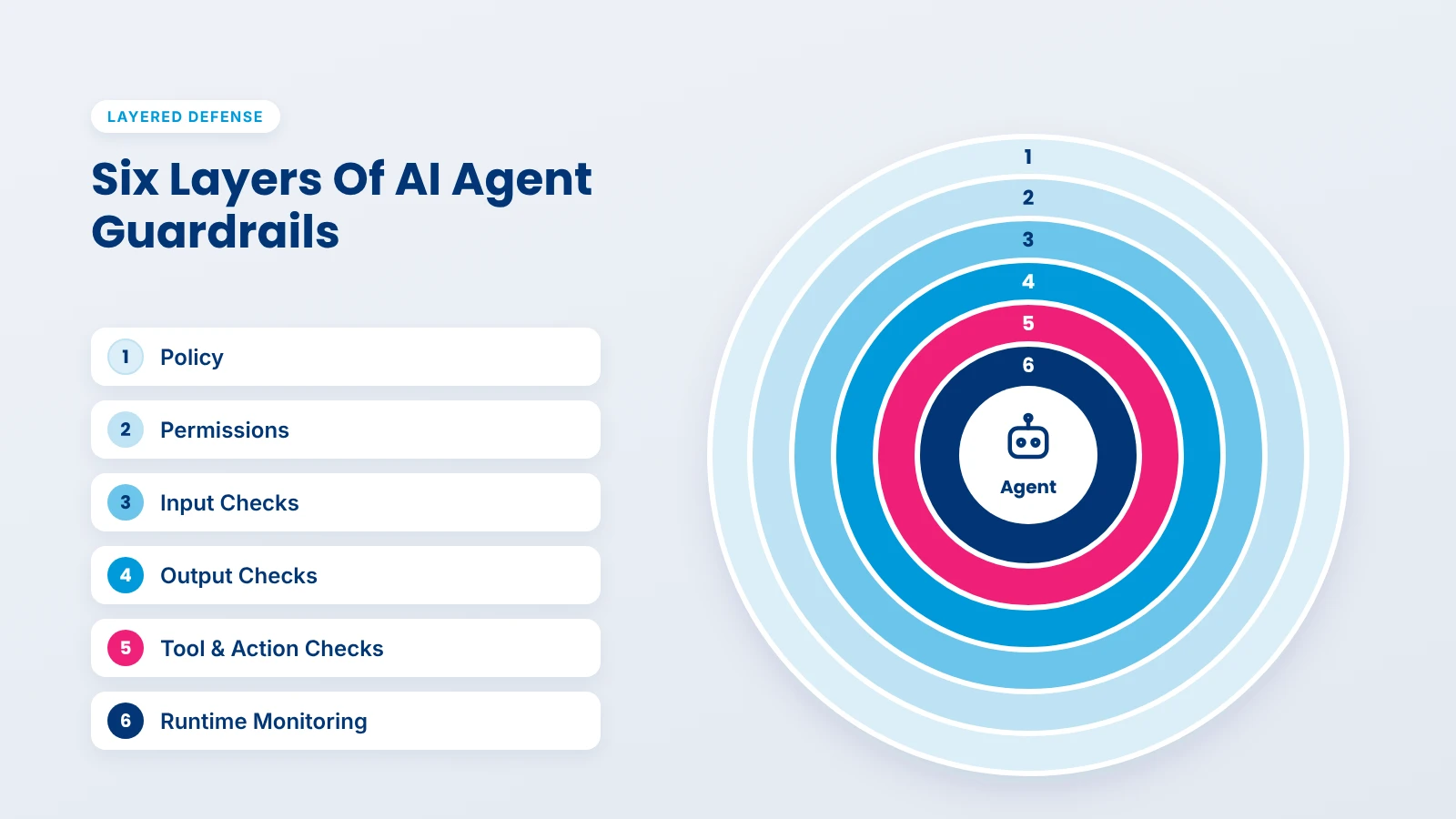
Effective AI agent guardrails are built as layers, so that when one check misses something, the next one catches it. No single layer is reliable enough to carry the whole load, and the cheapest layers often do the most work.
| Layer | What it controls | Typical implementation |
|---|---|---|
| 1. Policy | What the agent is for and what it must never do | A written policy, turned into rules and tests |
| 2. Configuration and permissions | Which tools, data and systems the agent can reach | Tool allowlists, scoped credentials, per-user authorization |
| 3. Input checks | What reaches the model | Prompt-attack detection, topic filters, PII detection |
| 4. Output checks | What the model returns | Safety classifiers, schema validation, grounding checks |
| 5. Tool and action checks | What the agent is allowed to do | Argument validation, limits, approval thresholds |
| 6. Runtime monitoring | How the agent behaves over time | Traces, alerts, rate limits, kill switch |
Start with a short written policy: the agent’s purpose, the actions it may take, the data it may touch and the things it must never do. This sounds like paperwork, but every check below is a translation of a line in this policy. Without it, teams add filters ad hoc and nobody can say what the agent is supposed to refuse. In larger organizations, this policy should sit under a wider AI governance framework that covers every AI system, not just this agent.
This is the strongest layer because it does not depend on the model behaving. If the agent has no tool to delete records, no prompt can make it delete records. Decide which tools exist, what each credential can reach, and whose authority the agent acts under. The next section covers this in detail.
Input checks screen what enters the model’s context: the user’s message, but also retrieved documents and tool results. Common checks include prompt-attack detection, off-topic filtering, PII detection and simple length or format limits. NVIDIA’s NeMo Guardrails documents separate rail types for user input and for retrieved content, a useful reminder that a document from your own knowledge base is still input. In a production RAG architecture, that means screening documents when they are ingested as well as when they are retrieved.
Output checks run on what the model produces before anyone or anything uses it. They catch unsafe or off-policy text, leaked personal data, answers that are not grounded in the provided sources, and malformed output such as invalid JSON. For agents, schema validation is often the most valuable output check: a tool call with a missing or wrongly typed field should fail loudly, not half-run.
This is the layer that separates guardrails for AI agents from chatbot filters. Before a tool runs, validate its arguments, check them against business limits and decide whether a person must approve. After it runs, check the result before it flows back into the model. The OpenAI Agents SDK, for example, supports tool guardrails that run on every function-tool call, before and after execution.
Some problems only show up across many calls: an agent stuck in a loop, a sudden spike in refunds, a user probing for weaknesses. Record every model call, tool call and guardrail decision in the same traces you use for AI agent observability, alert on unusual patterns, rate-limit high-impact actions and keep a kill switch that can disable a tool or the whole agent without a redeploy.
Least privilege means the agent gets only the tools, data and permissions its task requires, and nothing it might need someday. It is the single most effective AI agent security control, because it limits the damage of every other failure.
OWASP’s guidance on Excessive Agency translates well into practice:
get_order_status(order_id) over an open-ended one such as a raw SQL query or a shell command.In practice, the most common gap is a single powerful service account shared by every tool. It is quick to set up and very hard to secure later. Most AI agent frameworks let you attach separate credentials per tool, so do it from the first version.
Not every action deserves the same scrutiny. Sort the agent’s actions by impact and reversibility, then attach a rule to each tier. Approval thresholds work best when they are explicit numbers and categories, not judgment calls left to the model. They also decide where a human-in-the-loop review step is worth its cost.
| Tier | Examples | Rule |
|---|---|---|
| Low | Look up an order, draft a reply, search a knowledge base | Runs automatically, logged |
| Medium | Send a templated email, update a ticket, refund under a set amount | Runs automatically within rate limits, sampled for review |
| High | Refund above the threshold, change account details, contact a new recipient | Waits for human approval |
| Prohibited | Delete customer data, change permissions, move money outside approved accounts | Not available to the agent at all |
Add hard caps as well as thresholds: a maximum number of actions per task, per user and per hour, and a spending limit per run. Caps catch the failures nobody predicted, such as an agent that retries the same refund ten times.
Agents see personal data constantly: names in tickets, addresses in orders, account numbers in emails. Guardrails should decide where that data is allowed to go.
If you serve customers in the EU, these steps also support your GDPR obligations.
Prompt injection is the attack that most guardrails are ultimately defending against. The OWASP definition separates direct injection, where a user types malicious instructions, from indirect injection, where instructions hide inside content the agent reads, such as a web page or an email. Indirect injection is the bigger risk for agents, because the agent reads so much content nobody has checked.
Detection models help, but none catch every attack, so design as if some will get through. Meta’s security team proposed a practical rule for this, the Agents Rule of Two: within one session, an agent should combine no more than two of these three properties: processing untrusted input, accessing sensitive systems or private data, and changing state or communicating externally. When a task genuinely needs all three, it needs human supervision.
The guardrail tool market splits into four groups: orchestration frameworks that run checks around the agent, validation libraries, safety classifier models, and managed cloud services. Most production systems combine two or three, because each covers different layers.
| Tool | What it is | Strongest at | Trade-off |
|---|---|---|---|
| NeMo Guardrails | Open-source toolkit (Apache 2.0) from NVIDIA; rails defined in config and the Colang language | Orchestrating input, retrieval, dialog, tool and output rails in one place | Learning curve for Colang; extra model calls add latency |
| Guardrails AI | Open-source Python framework (Apache 2.0) with reusable validators from its Hub | Validating structured output and composing many specific checks | Mostly content and format checks; action policy is still yours to build |
| Llama Guard 4 | Meta’s 12B safety classifier for prompts and responses, text and images, based on the MLCommons hazard taxonomy | Self-hosted content safety classification | Needs GPU capacity; covers harm categories, not your business rules |
| Amazon Bedrock Guardrails | Managed policies: content filters, denied topics, word filters, sensitive-information filters, contextual grounding and Automated Reasoning checks | Teams on AWS who want managed filters with little setup | Tied to AWS; check pricing at your volume |
| Azure AI Content Safety Prompt Shields | Managed detection of user prompt attacks and attacks hidden in documents | Prompt-injection screening for teams on Azure | Detects attacks only; a clean result does not mean content is safe |
| Agent framework guardrails | Built-in hooks, such as input, output and tool guardrails in the OpenAI Agents SDK | Running checks at exactly the right point in the agent loop | You still supply the checks themselves |
A practical pattern: use your agent framework’s hooks to decide where checks run, deterministic code for business rules and permissions, one classifier or managed service for content safety and prompt attacks, and a validation library for structured output. Avoid stacking three overlapping classifiers on every call; each adds cost and latency with diminishing returns.
Guardrails also differ by agent type. A customer service AI agent needs strong PII handling and refund limits; a research agent that browses the web needs strong input screening; and in multi-agent systems, messages between agents should be checked like any other untrusted input, because one compromised agent can pass instructions to the next.
Every guardrail has a cost. It adds time to each step, and it will sometimes block something it should have allowed. Teams that ignore these costs end up with agents that are slow and frustrating, and then quietly switch guardrails off.
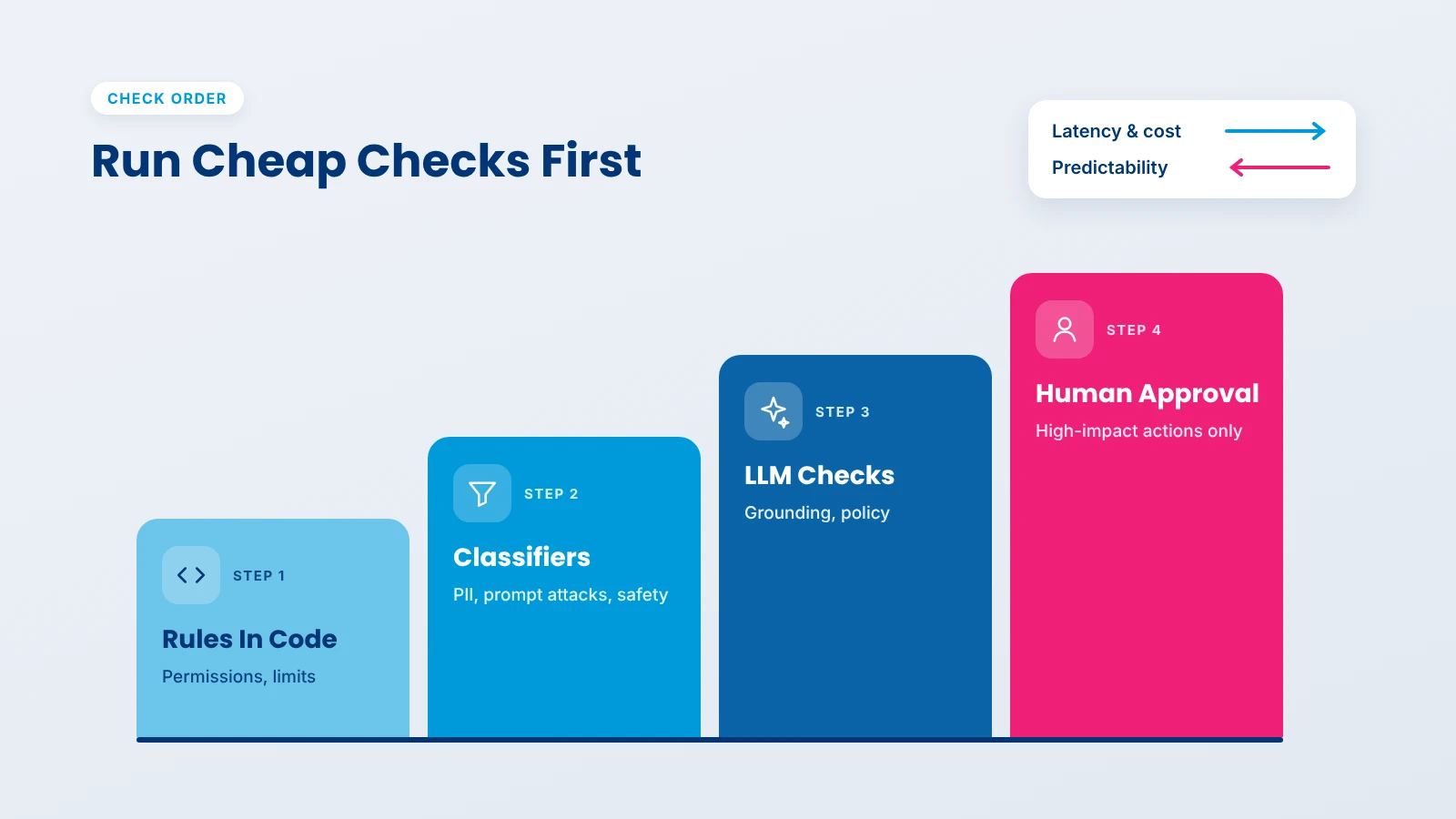
Run fast, deterministic checks first and save model-based checks for what they alone can catch.
Some frameworks let a check run alongside the agent instead of before it. The OpenAI Agents SDK runs input guardrails in parallel by default for lower latency, but notes that if the check trips, the agent may already have used tokens or run tools. A good rule: run checks in parallel when the next step is harmless, such as drafting text, and make them blocking before anything that changes state.
A guardrail that blocks one legitimate request in twenty will generate complaints fast. Before launch, run each check against a set of real, legitimate requests and record how often it fires wrongly, then tune thresholds per check. When a check blocks something, give the user a clear, specific message and a way forward, such as contacting a person, rather than a generic refusal. Add both blocked attacks and wrongly blocked requests to your AI agent evaluation test set, so every change is measured against both.
Guardrails change often: a new tool is added, a refund limit moves, a false positive needs fixing. Treat them like application code, with the same review and release process as the rest of your custom AI development work, not as dashboard settings someone edits by hand.
This simplified example shows a deny-by-default policy check that runs before every tool call, with tests that lock in the limits:
# guardrails/policy.py: versioned in git and reviewed like any other change
POLICY = {
    "get_order_status": {"tier": "low"},
    "issue_refund": {"tier": "medium", "approval_above": 50, "hard_limit": 200},
}

class PolicyViolation(Exception):
    pass

def check_tool_call(tool: str, args: dict) -> str:
    rule = POLICY.get(tool)
    if rule is None:
        raise PolicyViolation(f"{tool} is not on the allowlist")  # deny by default
    if tool == "issue_refund":
        if args["amount"] > rule["hard_limit"]:
            raise PolicyViolation("refund exceeds hard limit")
        if args["amount"] > rule["approval_above"]:
            return "needs_approval"  # route to a human reviewer
    return "allow"

# tests/test_policy.py
import pytest

def test_refund_over_hard_limit_is_blocked():
    with pytest.raises(PolicyViolation):
        check_tool_call("issue_refund", {"amount": 500})

def test_unknown_tool_is_blocked():
    with pytest.raises(PolicyViolation):
        check_tool_call("delete_customer", {"id": "c-1"})
Notice that the limits live in code the model cannot see or change. The model can ask for a $500 refund; it cannot get one.
We treat guardrails as part of the agent’s design, not a filter added before launch. Early in a project, often during AI consulting workshops, we write the agent’s policy with the client, list every tool and sort each action into risk tiers with clear approval thresholds. During the build, permissions are scoped per tool and per user from the first version, business limits are enforced in code and in the downstream systems, and every guardrail ships with tests. After launch, we review blocked requests and false positives with the client and tune thresholds based on real traffic.
Our ISO/IEC 42001 certification for AI management systems and ISO/IEC 27001 certification for information security shape how we document, test and audit these controls.
If you are planning an agent that acts on real systems, our AI agent development services cover guardrails from design to monitoring.
AI agent guardrails are what make it safe to give an agent real responsibility. Because agents act, read untrusted content and run in loops, LLM guardrails on the prompt and reply cover only part of the risk. The controls that matter most sit outside the model: least-privilege permissions, limits enforced in code, approval thresholds for high-impact actions and monitoring that catches what slips through. Layer cheap deterministic checks before expensive model-based ones, measure latency and false positives as carefully as blocked attacks, and keep every rule in version control with tests. Start strict, widen permissions only when the evidence supports it, and your agent can take on more work without taking on more risk.
AI agent guardrails are the policies, checks and permissions that keep an agent’s inputs, outputs and actions within approved limits. They include content filters, but also tool allowlists, scoped credentials, argument validation, approval thresholds for high-impact actions and runtime monitoring of what the agent does.
LLM guardrails mainly check what goes into a model and what text comes out. Guardrails for AI agents also control actions: which tools the agent can call, with which arguments, under whose authority and how often. Because agents change real systems, action controls usually matter more than text filters.
A system prompt helps set behavior, but it is not a reliable control. Models can be confused or manipulated into ignoring instructions. Any rule that must hold, such as a refund limit or a data-access boundary, should be enforced in code or in the downstream system, where the model cannot override it.
They add some latency, especially model-based checks. Keep the impact small by running deterministic checks first, using fast classifiers before LLM-based checks, running checks in parallel when the next step is harmless and reserving blocking checks for actions that change state.
It depends on your stack. NeMo Guardrails suits orchestrating many rail types, Guardrails AI suits validating structured output, Llama Guard suits self-hosted safety classification, and Amazon Bedrock Guardrails or Azure Prompt Shields suit teams on those clouds. Business rules and permissions still belong in your own code.
Detection models catch many injection attempts but not all, so guardrails limit the damage of the ones that get through. Least-privilege tools, limits in code, approval for high-impact actions and the Agents Rule of Two keep an injected instruction from turning into a harmful action.

Based on this article's topic
How human-in-the-loop AI agents work: when to require approval, the interrupt-and-resume architecture, real use cases and the mistakes that weaken oversight.
How AI agent memory works: short-term vs long-term memory, episodic, semantic and procedural types, storage choices, tools, and how to keep memory safe.

Discover how AI in travel and hospitality improves guest experiences, automates bookings, optimizes hotel operations, and transforms travel management.