Kotlin vs Java for Android App Development: Which Should You Choose in 2027?
Nov 16, 2026 App Development
Nov 16, 2026 App Development
Nov 16, 2026 App Development
Choosing a language is one of the first decisions in any Android project, and in 2027 the Kotlin vs Java question has a clearer answer than ever. It still deserves a careful look, because the right choice depends on whether you are starting fresh or maintaining an app that already runs on Java.
Three changes make the decision more important this year. Android 17 is built around Jetpack Compose, apps must now adapt to tablets, foldables and large screens, and on-device AI is becoming part of everyday app features.
This guide compares Kotlin and Java from a business point of view: what each means for your budget, timeline, team and roadmap. If you are planning a new build or a modernization.
When it comes to Kotlin vs Java for Android, the answer for new apps in 2027 is Kotlin. Google has made Compose the center of Android development, and its newest tools, samples and AI features assume Kotlin. Java remains a reliable language, and it still makes sense when you already have a large, stable Java codebase or share code with Java backend systems.
Choose Kotlin if:
Stick with Java if:
Java has been around since the mid-1990s and was the original language of Android. It runs on the JVM, powers a huge share of enterprise and backend software, and keeps improving through OpenJDK releases. Modern Java includes records, the var keyword and, on the server side, virtual threads.
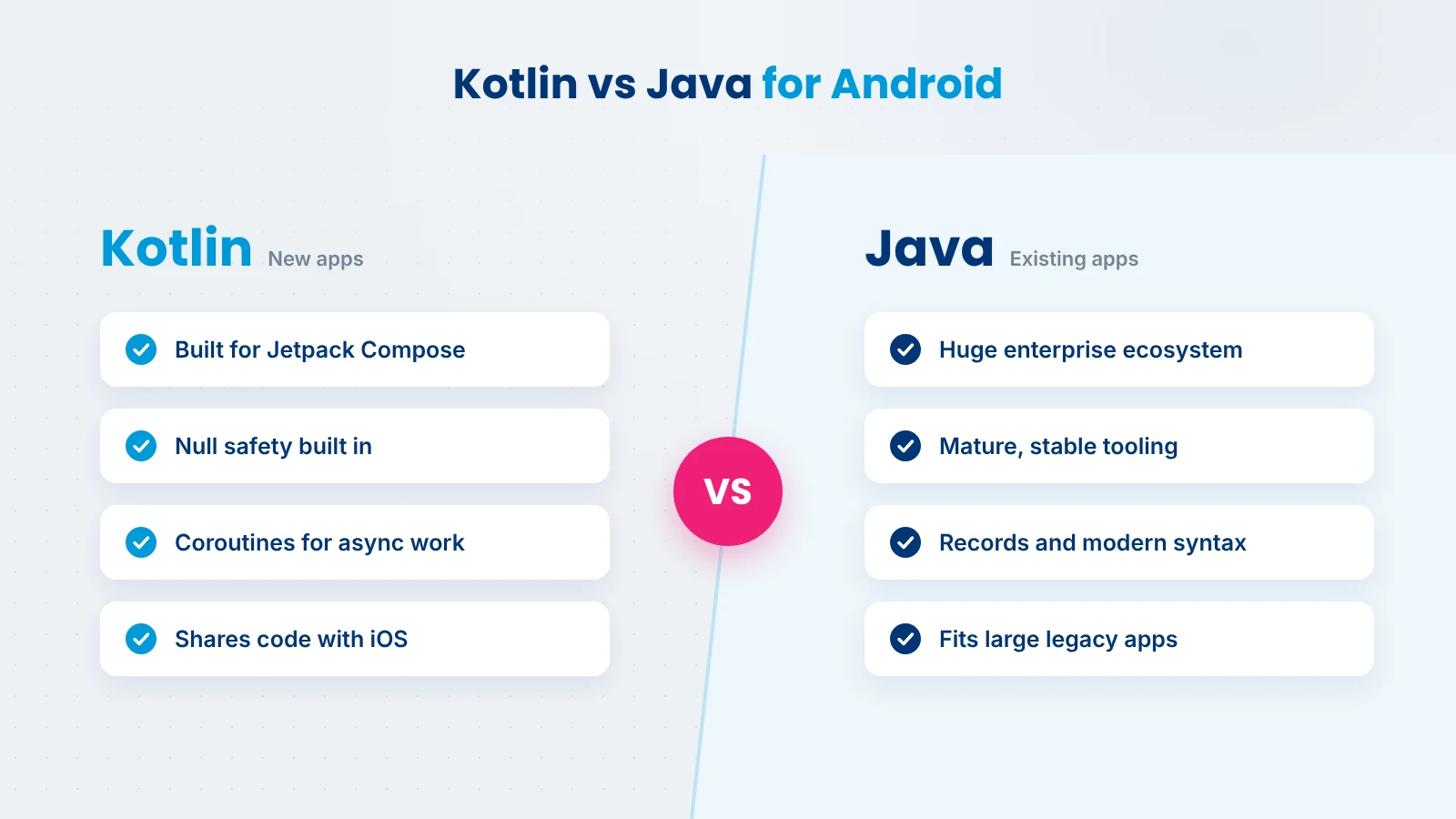
Kotlin is a modern, statically typed language created by JetBrains. It runs on the same JVM, works fully with Java code, and is the language Google promotes for Android. According to Google’s Android developer site, Kotlin is used by over 60% of professional Android developers. You can learn more on the official Kotlin site.
The main differences come down to five points:
This table covers the java vs kotlin points that matter most for Android projects in 2027.
| Factor | Kotlin | Java |
|---|---|---|
| Syntax and code length | Concise; less boilerplate for common tasks | More verbose, though records and var help |
| Null safety | Built into the type system | Relies on annotations, checks and discipline |
| Concurrency | Coroutines, the standard on Android | Threads and executors; virtual threads are mainly a server-side JVM feature |
| Jetpack Compose support | Full; Compose is written for Kotlin | Not supported for writing Compose UI |
| Google’s Android direction | New APIs, libraries and guidance target Compose and Kotlin | Supported, but legacy View-based libraries are in maintenance mode |
| Build speed | Improved a lot with the K2 compiler; can still be slower in some projects | Generally fast and predictable |
| Interoperability | Calls Java code directly | Calls Kotlin code directly |
| New Android and AI APIs | First to get samples, tooling and agent skills | Usable for many APIs, with fewer official samples |
| Learning curve | Easy for Java developers to pick up | Familiar to most developers |
| Talent availability | Standard skill for Android developers | Very large pool, especially in enterprise and backend |
In any Android Kotlin vs Java comparison, Kotlin’s advantages are practical. They show up in faster delivery, fewer crashes and easier access to new Android features.
Jetpack Compose is Android’s modern UI toolkit, and it is written for Kotlin. With Android 17, Google says all new Android APIs, libraries, tools and guidance will be built for Compose, while View-based libraries such as Fragments and RecyclerView move to maintenance mode. For a new app, that makes Kotlin the natural choice.
Null pointer errors are one of the most common causes of app crashes. Kotlin makes nullability part of the type system, so the compiler flags risky code early. That means fewer production bugs and less time spent on support tickets.
Network calls, database reads and file work must run off the main thread. Kotlin coroutines handle this with clear, readable code, and they are deeply integrated into Android libraries. Java can do the same work, but it usually needs more code and more care.
Kotlin removes much of the boilerplate Java needs for data classes, callbacks and simple logic. Less code means faster reviews, fewer places for bugs to hide and lower maintenance effort over the life of the app.
Google’s Android documentation, code samples and new tooling are written in Kotlin first. Teams using Kotlin can adopt new platform features faster, because they can follow official examples directly instead of translating them.
Kotlin vs Java is not a one-sided contest. Kotlin being the default for new Android apps does not make Java a poor choice. Java is mature, stable and widely used, and it remains the better option in several situations:
Modern Java is also far better than the Java many older comparisons describe. Records, var and long-term support releases such as Java 21 and Java 25 have made it more concise and pleasant to use, even if Android does not always support the newest JDK features right away.
Here is a simple order model in both languages. The Java version uses a record, which is the modern way to write this kind of class.
data class Order(
    val id: String,
    val total: Double,
    val note: String? = null   // nullable by design
)

val order = Order("A102", 49.99)
val updated = order.copy(total = 59.99)
val noteLength = order.note?.length ?: 0public record Order(String id, double total, String note) {
public Order(String id, double total) {
this(id, total, null);
}
}
Order order = new Order("A102", 49.99);
Order updated = new Order(order.id(), 59.99, order.note());
int noteLength = order.note() != null ? order.note().length() : 0;Both versions work. The Kotlin one is shorter, handles default values and copying built in, and makes the nullable note explicit in the type. Across a full app, these small differences add up.
Start with the market benchmarks. According to Clutch’s app development pricing data, the average app project costs about $90,780 and takes around 11 months, most reviewed projects fall between $10,000 and $49,999, and Android developers typically charge $25 to $49 per hour. Language choice moves a project within these ranges; it rarely takes it outside them.
Build cost and timeline: Kotlin and Compose usually mean less code per screen and faster iteration, which tends to shorten the build. A Java app using older View-based UI generally needs more time for the same features.
Maintenance: Yearly app maintenance commonly runs about 15% to 20% of the original build cost, as DesignRush notes. For an app that costs $90,000 to build, that is roughly $13,500 to $18,000 a year. With Google moving legacy View libraries to maintenance mode, a Java and XML app may face higher upkeep over time as more new features assume Compose.
Hiring: Kotlin is now a standard skill for Android developers, so hiring for a Kotlin project is straightforward. Java developers are easy to find too, and most can become productive in Kotlin quickly, which keeps the cost of a gradual move low.
Also Read: Mobile App Development Cost
In its Android 17 announcement, Google describes Android as Compose-first. New APIs, libraries, tools and developer guidance are built for Jetpack Compose, and legacy View components get only critical fixes. Google also offers an AI-driven skill to help convert XML layouts to Compose. You can review the full list of changes on the Android 17 features page.
For businesses, the message is simple: new Android work should be planned around Compose, and therefore around Kotlin.
Apps targeting API level 37 can no longer opt out of orientation and resizability rules on large screens. That means your app must work well in any window size, from phones to tablets, foldables and desktop-style windows, with games as the main exception.
Compose makes this easier with adaptive navigation and multi-pane layouts. Older View-based apps can adapt too, but they usually need more manual work.
AI is quickly becoming part of what users expect from Android apps. Practical features a business can add include:
AppFunctions is a new Android platform API, currently in alpha, that lets apps expose their capabilities as tools that AI agents and assistants can discover and run. Google describes it as the on-device equivalent of the Model Context Protocol. Developers add functions by annotating Kotlin classes and documenting them, so apps written in Kotlin are best placed to adopt it.
Gemini Nano runs on the device through Android’s AICore system service, and the ML Kit GenAI APIs use it for tasks such as summarization, proofreading, rewriting, image description, speech recognition and semantic search. Because processing happens on the device, user data does not need to be sent to the cloud. That helps with privacy, lowers AI running costs and keeps features working offline.
AI assistance in Android Studio, such as Gemini in Android Studio, helps developers write, explain and refactor code faster. It works with both languages, but it is especially useful with Kotlin and Compose, where Google’s newest examples and agent skills are focused. It can also speed up parts of a Java to Kotlin migration.
If you are planning AI features beyond what Android provides out of the box, our AI development services cover custom models, LLM integration and AI agents.
Kotlin Multiplatform lets teams share Kotlin code across Android, iOS and other platforms while keeping a native experience on each one. It is one of the clearest Kotlin advantages over Java for companies that run apps on both platforms.
Compared with Flutter and React Native, which share the UI as well, Kotlin Multiplatform keeps each app fully native and lets you share as much or as little as you want. If you are weighing these options, see our cross-platform app development services.
Also Read: SwiftUI vs UIKit
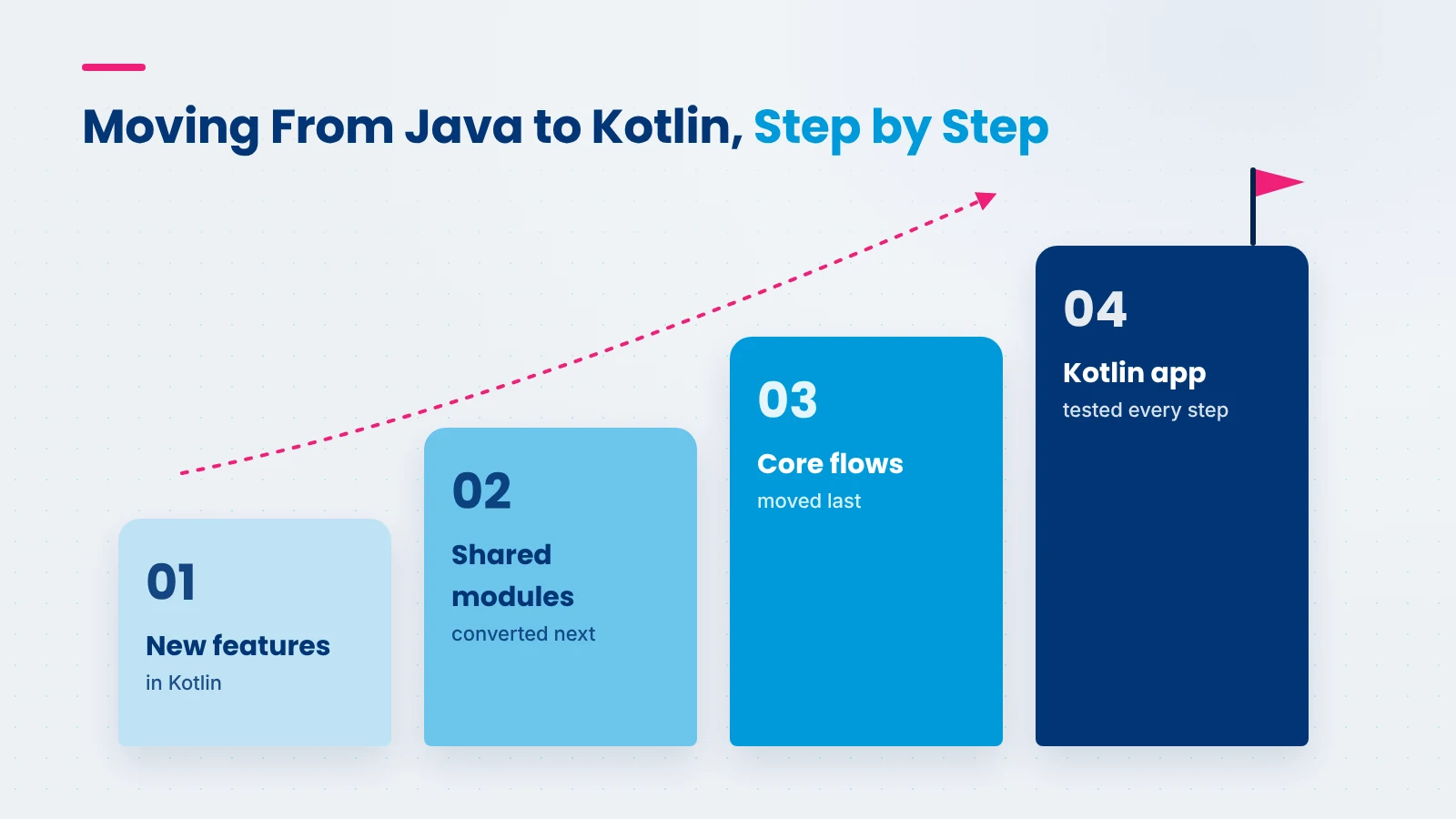
Because Kotlin and Java work in the same project, you don’t have to migrate everything at once. Use this checklist to decide.
Migration is likely worth it if:
Migration can wait if:
A phased migration approach
Android Studio includes a Java-to-Kotlin converter that is a useful starting point. Treat its output as a first draft: the converted code still needs review to make it idiomatic and safe.
At Xicom, we look at your existing code, your team, your AI plans and your budget before recommending Kotlin, Java or a phased mix of both. For new apps, that usually means Kotlin and Jetpack Compose; for established apps, a migration plan that keeps releases on schedule.
With 20+ years in software development, 750+ clients and 1,800+ projects delivered, our team of 350+ IT professionals builds and modernizes Android apps across healthcare, fintech, retail, logistics and more. We hold a 4.8 rating on Clutch and follow CMMi Level 3 processes for predictable delivery.
You can work with us on a project basis or hire Android developers to extend your own team. Explore our Android app development services or talk to us about your app.
The Kotlin vs Java decision in 2027 is less about which language is better in general and more about where your Android app is heading. For new apps, Kotlin is the clear choice, because Compose, adaptive layouts and Android’s new AI features are all built around it.
For established Java apps, there is no need to rush. A gradual move to Kotlin, starting with new features, lets you modernize without putting your product or roadmap at risk.
For new Android apps, yes. Google now builds new Android APIs, libraries and guidance for Jetpack Compose, which is designed for Kotlin, and its newest AI features and samples assume Kotlin. Java is still fully supported and works well for existing apps, but Kotlin gives new projects easier access to modern Android features.
Both run on the JVM and work together in one project. Kotlin is more concise, has null safety built into its type system and uses coroutines for background work. Java is older, more verbose and has a very large enterprise ecosystem. On Android, Kotlin is the language Google builds its newest tools around.
The main Kotlin advantages over Java are full Jetpack Compose support, built-in null safety, simpler background work with coroutines, less boilerplate code and Kotlin-first documentation from Google. Kotlin also supports Kotlin Multiplatform, which lets teams share business logic between Android and iOS apps.
Yes. Many existing Android apps are written partly or fully in Java, and Java remains fully supported on Android. However, new Android UI work is moving to Jetpack Compose, and legacy View-based libraries are in maintenance mode, so most new Android development now happens in Kotlin.
Yes. Kotlin and Java are fully interoperable, so Kotlin code can call Java code and the other way around within one project. This is why most teams migrate gradually, writing new features in Kotlin while keeping stable Java code in place until it makes sense to convert it.
At runtime, Kotlin and Java perform about the same, because both compile to bytecode that runs on Android’s runtime. Build times can differ: Kotlin builds were historically slower, though the K2 compiler has improved this. In practice, code quality and architecture affect app speed far more than the language choice.
It depends on the size of the codebase, the amount of legacy UI and whether you migrate in phases. A phased migration is usually priced like regular feature work, and Clutch data puts typical Android developer rates at $25 to $49 per hour. A short code audit gives the most reliable estimate.

Based on this article's topic
Jetpack Compose in 2027: learn what it is, how it compares with XML, why Android 17 is Compose-first, and how to plan your Android app migration and costs.
SwiftUI vs UIKit in 2027: compare cost, speed, AI features and foldable support to choose the right framework for your iOS app, with a clear migration path.

Fintech app development cost ranges from $35,000 to $450,000+. See prices by app type, feature and region, plus AI, compliance and running costs.