How to Integrate Android AppFunctions Into an AI-Powered Mobile App
Nov 19, 2026 App Development
Nov 19, 2026 App Development
Nov 19, 2026 App Development
Quick Answer
To integrate Android AppFunctions, pick a few high-value, low-risk actions in your app, wrap each one as a narrow function with the AppFunctions Jetpack library, describe it clearly in KDoc so agents know when to use it, add confirmation for sensitive actions, and test both the function itself and how well an agent selects it. AppFunctions run on Android 16 and above and are still an experimental preview, so design for API changes.
For most of the smartphone era, getting something done meant opening an app and tapping through its screens. Android AppFunctions change that model. They let an Android app publish a small set of its own actions, such as creating a task, finding an order or logging an expense, so that an authorized AI agent like Gemini can find and run them when a user simply says what they want.
For product owners, this raises a practical question: which parts of the app should agents be able to use, and how do you expose them without opening up the whole product? This guide walks through how to integrate Android AppFunctions into an AI-powered mobile app, from picking the first functions to testing them with real agent prompts.
Android AppFunctions are an Android platform API with an accompanying Jetpack library that let an app expose specific capabilities as tools. Google describes them as the mobile equivalent of tools in the Model Context Protocol (MCP): where MCP connects agents to server-side tools, AppFunctions give agents the same kind of access to features inside Android apps.
The idea went mainstream in early 2026, when 9to5Google reported on Google detailing how Gemini would use Android apps through this framework. Google’s own post on building for the intelligence system on Android positions AppFunctions as the option for teams that want more control over how agents interact with their app.
The flow has four stages:
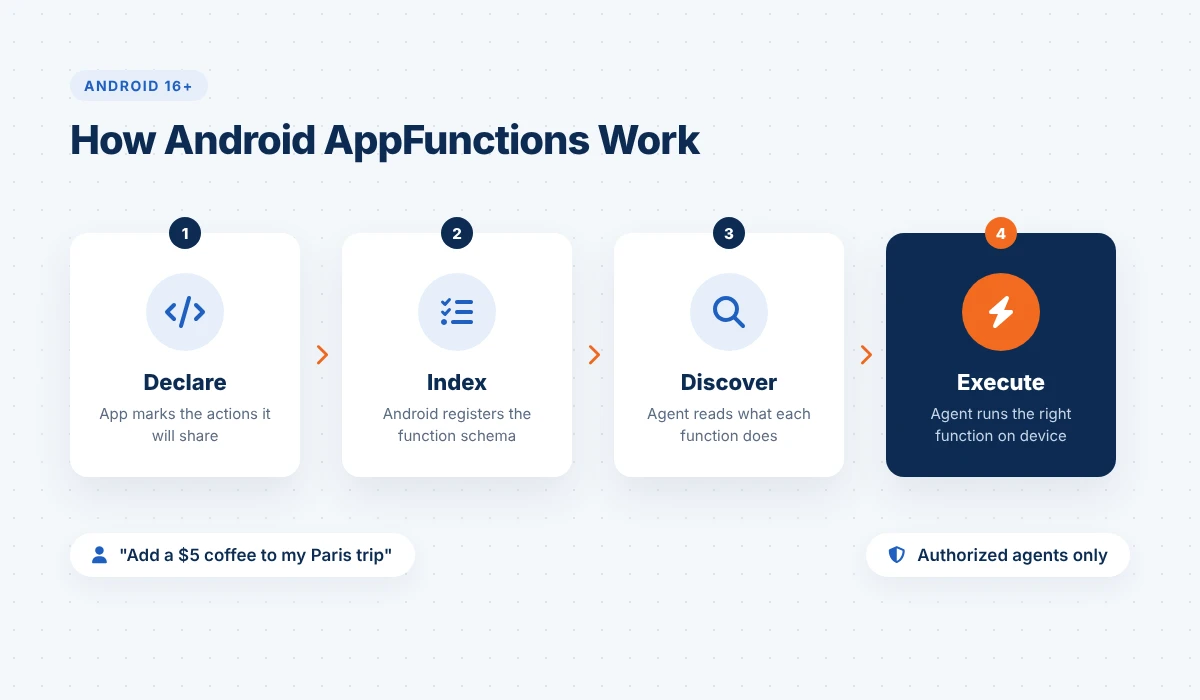
Only callers holding the EXECUTE_APP_FUNCTIONS permission can discover and run these functions, and Android grants that permission to authorized system assistants. That matters for trust: your app decides what it shares, and the platform decides who may call it.
AppFunctions are available on devices running Android 16 or higher and are labelled an experimental preview whose API surface may change. The Jetpack library is still in alpha; version 1.0.0-alpha13, released in October 2026 according to the AppFunctions release notes, added dynamic function registration. Publishing an integration that works with Gemini currently goes through Google’s Connected Apps Platform developer preview, so most teams today are building and testing their functions ahead of wider availability.
In practice, AppFunctions are the device-side half of the broader shift toward agents. If your roadmap also includes server-side agents, our AI agent development services cover that side of the stack.
Agents can reach your product in more than one way, and choosing between them is the first architecture decision. Alongside AppFunctions, Google has also described a UI automation route, where an agent operates an app’s screens on the user’s behalf. Here is how the three approaches compare.
| Android AppFunctions | Remote MCP server | Agent UI automation | |
|---|---|---|---|
| Where it runs | On the device, inside your app | In the cloud, over the network | On the device, through the app’s UI |
| Uses live app state | Yes, the app’s local data and session | Only what your backend holds | Yes, whatever the screen shows |
| Platforms | Android only | Any client that speaks MCP | Android only |
| Developer effort | Annotate and describe chosen functions | Build and host a separate server | Little or none on your side |
| Control over what agents do | High: you choose each function and its inputs | High, on the server side | Low: the agent drives your screens |
| Best fit | Fast, private actions on user data already in the app | Actions that live in your backend or must work across platforms | Apps that have not exposed anything yet |
The two structured options are not rivals. A banking app might expose “show my last five transactions” as an AppFunction, because that data is already on the phone, while keeping a payment workflow behind a server-side tool with stronger checks. Deciding where each capability should live is a good topic for an early AI consulting session, before any code is written.
Also Read: Android App Development Cost
Google’s own examples are everyday requests: a reminder that becomes a createTask call, a playlist built from a spoken description, or a calendar event added with one sentence. The most interesting one chains two apps, where an agent finds a recipe in an email and adds its ingredients to a shopping list. That cross-app step is something no single app could do on its own.
For businesses, the value shows up when a frequent task takes several screens today. A few patterns by industry:
The common thread is that AppFunctions add a second way in, not a replacement. Users who want to browse, compare or explore will still use your screens. This builds on the wider move toward AI in mobile app development, where apps are expected to act on intent rather than only respond to taps.
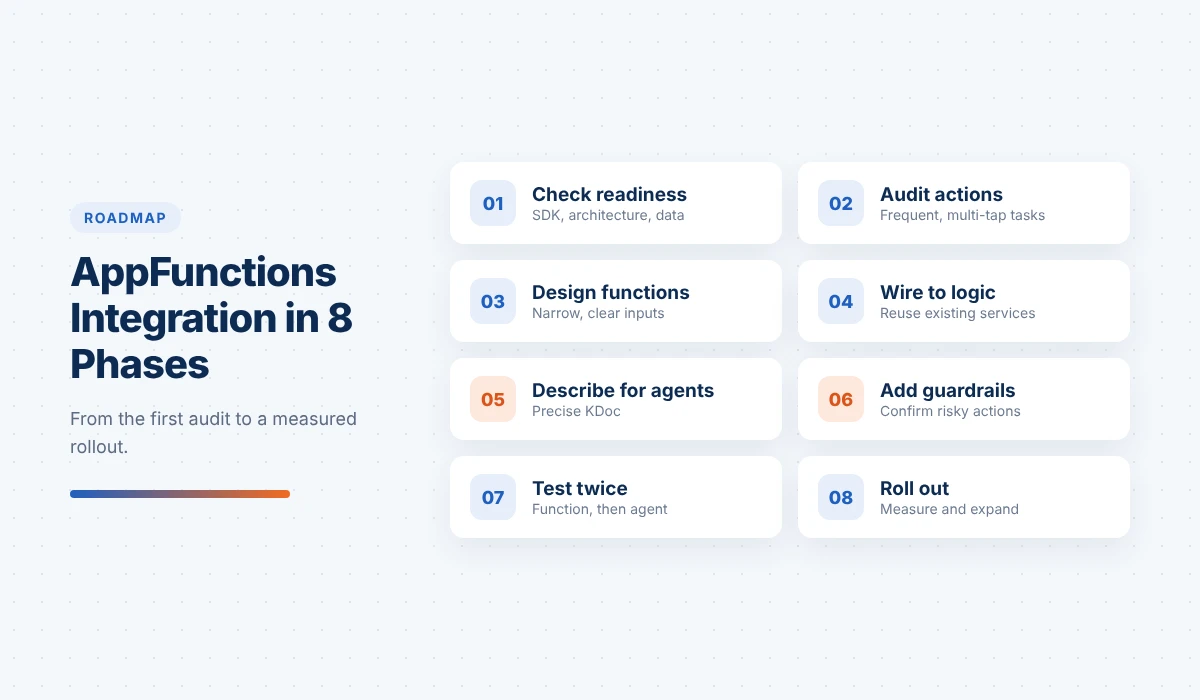
A good AppFunctions integration is mostly product and design work, with a thin layer of code on top. The phases below are how we would approach it for an existing app.
Confirm your app targets the newest Android SDK (Android 16 is API level 36), that your core logic sits in services or repositories rather than inside screens, and that you know which user data lives on the device. If business rules are tangled into UI code, untangling them comes first, because each AppFunction should call the same logic the screens use.
List the tasks users perform most often and count the taps each one takes today. Strong candidates are actions with clear inputs and a clear result, such as creating a record, finding a specific item, updating a field or starting a defined workflow. Ask one question of each: would a user rather say this than navigate to it? Start with three to five functions, not fifty.
Treat each function as a public contract. “Find transactions by merchant and date range” is better than a broad “manage my account” function, because an agent can choose it confidently and fill its inputs correctly. Define each parameter’s type, format and allowed values, and decide which ones are optional with sensible defaults.
Add the AppFunctions Jetpack library, annotate the chosen functions, define any data models the agent will send or receive as serializable types, and register the service Android uses for discovery. The function layer should stay thin and call your existing repositories, so validation, pricing and permission rules live in one place.
This is the step teams underestimate. Agents decide which function to call from its description, which Google recommends writing in KDoc so it becomes part of the tool schema. Each description should say what the function does, when to use it, what every parameter means with an example value, and what it returns. When a call fails, return one of the library’s predefined errors, such as an invalid argument, so the agent can explain the problem or ask the user to rephrase.
Decide what agents must never do and leave it out. For actions with consequences, such as payments, deletions, account changes or messages sent to other people, require an explicit confirmation step in the app rather than acting on a single sentence. Log every call so support teams can trace what an agent did and why.
Test at two levels. First, check that each function returns the right result: Google’s AppFunctions documentation lists ADB commands to confirm registration and run functions directly, and recommends testing omitted defaults, main-thread calls, error handling and model-generated inputs. Second, test whether an agent picks the right function from realistic prompts, including vague and badly phrased ones. A function can work perfectly when called directly and still be ignored because its description is unclear.
Because the API is still an experimental preview, keep the function layer isolated so library updates touch as little code as possible. Teams that want their app to work with Gemini can apply to Google’s developer preview, which limits early use to a tester list. Track which functions agents call, how often calls fail, and which requests had no matching function, then add new functions from that evidence.
If your team needs extra hands for this work, you can hire Android app developers who already work with Kotlin, Jetpack and on-device AI.
Planning an agent-ready Android app? Xicom’s custom Android app development services team can audit your app, shortlist the right functions and build an AppFunctions layer that is ready for the next API update. Talk to our team.
Most problems we expect to see in early AppFunctions projects come from treating them like a normal API instead of a tool an AI model has to understand.
Also Read: How Long Does It Take to Develop an App
Android AppFunctions are Android-only, but the design work carries over. Apple’s App Intents framework plays a similar role on iOS, exposing app actions to Siri, Shortcuts and system features. If you define your agent-ready actions once, as a shared list of capabilities with clear inputs and outputs, you can implement them natively on each platform. Cross-platform apps built with Flutter or React Native will usually need a native module for each side, since both integrations live at the operating system level.
The bigger shift is in how products are planned. Apps now need two layers: a visual interface for people and a capability layer for authorized agents. This is the same pattern behind agentic AI for businesses more broadly, now arriving on the phone.
Android AppFunctions give AI-powered mobile apps a structured, permissioned way to let agents act on a user’s behalf, using data that already sits on the device. The technology is still in preview, which makes this a good time to prepare rather than to rush: audit the actions your users repeat, design a few narrow functions, describe them well, and build the guardrails before you widen access. Teams that do this groundwork now will be ready when agent access reaches more users and devices.
If you are deciding how agents fit into your product, Xicom’s custom AI development services team can help you plan and build the full stack, from on-device AppFunctions to the backend agents and models behind them.
Android AppFunctions are an Android platform API and Jetpack library that let an app expose selected actions, such as creating a task or finding an order, as tools that authorized AI agents like Gemini can discover and run on the device.
AppFunctions are available on devices running Android 16 or higher. The feature is still an experimental preview, so the API may change before it becomes stable.
Google describes AppFunctions as the mobile equivalent of MCP tools. An MCP server runs in the cloud and works across platforms, while AppFunctions run locally inside an Android app and use the app’s existing on-device data and state.
No. Callers need the EXECUTE_APP_FUNCTIONS permission, which Android grants to authorized system assistants. Your app also decides which functions to expose in the first place.
No. They add a second way to use the app for task-based requests. Users who want to browse, compare or explore will still use the screens you design.
Start with three to five frequent, clearly defined actions that take several taps today and carry low risk, such as searching records, checking a status or creating an item. Leave payments, deletions and account changes until confirmation flows are in place.
Test each function directly using the ADB commands in Google’s documentation, then test with realistic natural-language prompts to see whether an agent selects the right function and fills its inputs correctly.
Yes, but the integration is native. Cross-platform apps typically add AppFunctions through a native Android module, and use Apple’s App Intents for the equivalent on iOS.

Based on this article's topic
How long does it take to develop an app? See typical timelines by complexity, phase, platform and app type, plus practical ways to launch sooner.
Swift vs Objective-C compared on safety, concurrency, performance, interop and hiring, plus a practical playbook for migrating legacy iOS code.
See how on-device AI works in mobile apps, which Android, iOS and cross-platform frameworks to use, real use cases and the steps to build.