Human-in-the-Loop AI Agents: Architecture & Use Cases
How human-in-the-loop AI agents work: when to require approval, the interrupt-and-resume architecture, real use cases and the mistakes that weaken oversight.
Nov 13, 2026 Artificial Intelligence
AI agent memory decides whether your agent feels like a colleague who remembers the last conversation or a stranger you have to brief every time. Language models are stateless: each call starts from nothing but what you put in the prompt. Memory is the layer you build around the model to hold what happened earlier in a task, what it learned about a user and how it should do its job. This guide explains short-term and long-term memory, the three kinds of long-term memory, how to store and update them, which tools to use and how to keep stored memory accurate, private and safe.
AI agent memory is any mechanism that lets an agent reuse information from earlier steps, sessions or users when it decides what to do next. Without it, an agent forgets the user’s name between messages, repeats tool calls it already made and cannot improve from past mistakes.
The obvious shortcut is to paste everything into the prompt, since context windows keep growing. It does not hold up in production, for three reasons:
So memory is a design problem, not a setting. You decide what the agent should hold right now, what it should store for later and how it should find the right piece at the right moment. If you are new to agents, our guide to building an AI agent shows where memory fits among the model, tools and planning loop.
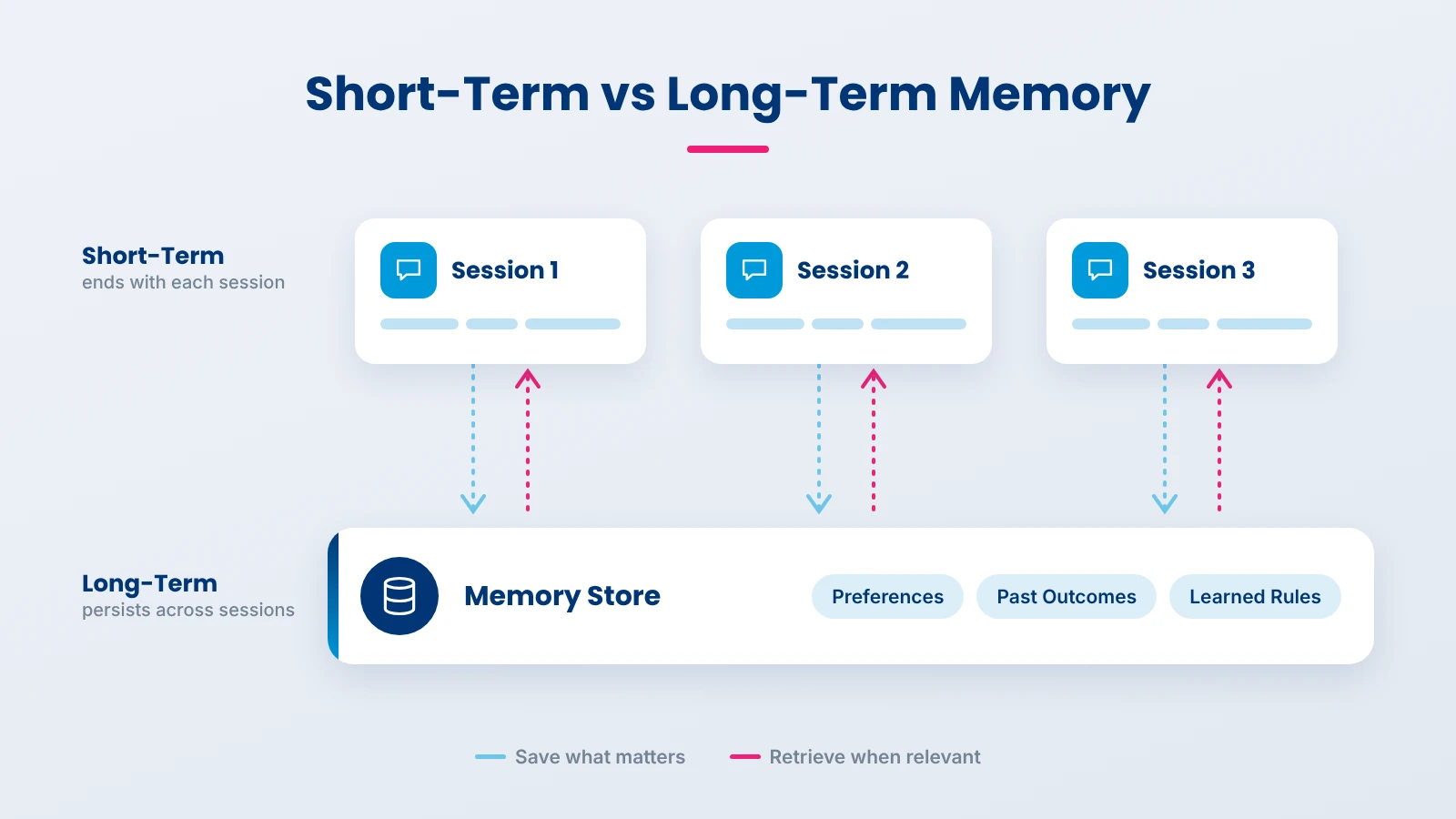
Short-term memory holds what the agent needs for the task in front of it and disappears when the task or session ends. Long-term memory persists across sessions, so the agent can use it next week or for another task. The LangGraph memory documentation draws the same line: short-term memory is scoped to a single thread and saved with the agent’s state, while long-term memory lives in a store that any thread can read.
| Short-term memory | Long-term memory | |
|---|---|---|
| Lifespan | One task or conversation | Across sessions, days or months |
| Where it lives | Context window plus saved session state | External store: database, vector index, key-value or graph |
| What it holds | Recent messages, tool results, the current plan, scratch notes | User preferences, facts, past outcomes, learned rules |
| How it is accessed | Always present in the prompt | Retrieved when relevant, then added to the prompt |
| Main risk | Overflowing the window, losing early details | Retrieving stale, wrong or irrelevant memories |
| Typical size | Thousands of tokens | Unbounded, so retrieval quality matters most |
Short-term memory fills up during long tasks. Three techniques keep it useful:
In practice, the scratchpad matters most. An order ID kept as a typed field never gets summarized away; the same ID buried in turn three of a long chat often does.
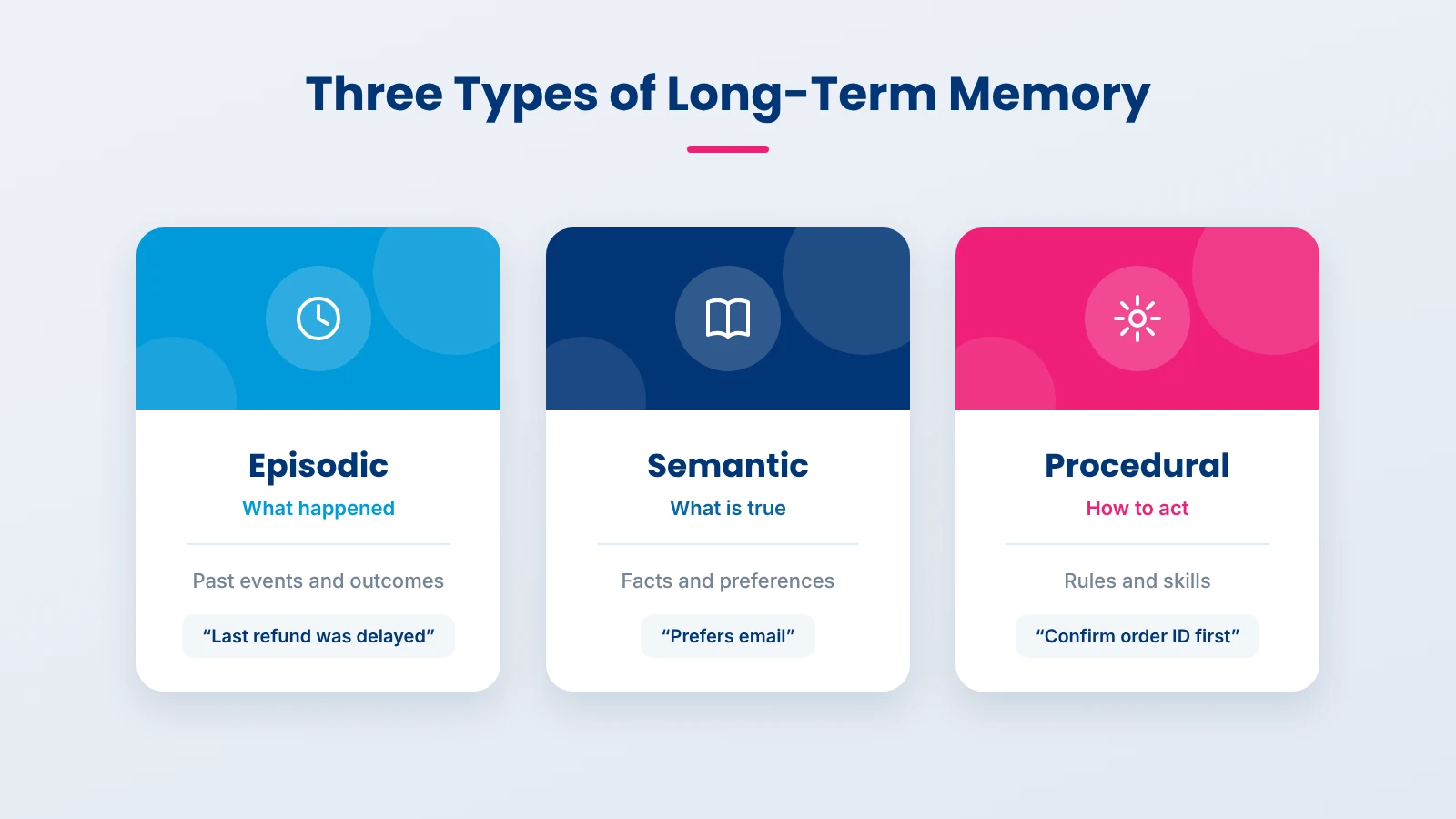
Long-term memory for AI agents comes in three kinds: episodic, semantic and procedural. The split comes from cognitive science and was mapped onto language agents in the Cognitive Architectures for Language Agents (CoALA) paper, which also names working memory as the short-term layer for the current decision.
| Type | What it stores | Example in a support agent | Typical storage |
|---|---|---|---|
| Episodic | Past events and experiences | Last month this customer’s refund was delayed and they escalated | Logged interactions, retrieved by similarity or time |
| Semantic | Facts about the world, the user or the business | Prefers email, account on the Business plan, based in Texas | User profile record, knowledge base, vector store |
| Procedural | How to do the job: rules and skills | Always confirm the order ID before issuing a refund | System prompt, code, tools, sometimes model weights |
Episodic memory lets an agent learn from what happened before. A common, practical use is storing successful past runs and showing a few relevant ones to the model as examples when a similar task comes up. It is also how an agent can say that an approach failed last time instead of repeating the mistake.
Semantic memory holds facts. For users, this is often a profile that the agent updates as it learns, such as preferred language or plan type. For the business, it overlaps with retrieval-augmented generation: product documents and policies are semantic memory the agent searches when needed. If that part matters most to you, our guide to production RAG architecture goes deeper.
Procedural memory is the agent’s know-how. Most of it lives in the system prompt, the tool definitions and the code. Some agents refine their own instructions over time, for example adding a rule after a reviewer corrects them. Changing the model’s weights is also procedural memory, but it is slow and costly to update, which is why most teams adjust prompts and tools first. Our comparison of RAG vs fine-tuning covers when changing weights is worth it.
Every agent memory architecture runs the same loop: read relevant memory before acting, act, then decide what is worth writing back. What differs is where memory is stored and who decides what to save.
The LangGraph docs describe two options. Writing memory in the hot path means the agent saves memories during its run, so they are available immediately and the user can see what was stored, at the cost of extra latency. Writing in the background runs memory extraction as a separate job after the conversation, which keeps responses fast but means new memories appear a little later. Most production systems use the background approach for profiles and summaries, and the hot path only for things the user explicitly asks the agent to remember.
| Storage | Best for | Watch out for |
|---|---|---|
| Relational or key-value database | User profiles, settings, structured facts | Needs a schema; less flexible for free text |
| Vector store | Past conversations and notes retrieved by meaning | Similar is not the same as relevant; needs filters by user and time |
| Knowledge graph | Relationships between people, accounts and events | More effort to build and keep updated |
| Event log | A full, ordered history for audit and replay | Too large to search directly; pair it with summaries |
Many agents combine two: a profile table for facts that must be exact and a vector store for everything that is better found by meaning.
This simplified example saves a fact the user stated and loads the profile before the agent plans. LangGraph and other AI agent frameworks offer similar store interfaces.
from langgraph.store.memory import InMemoryStore  # use a database-backed store in production

store = InMemoryStore()
profile_ns = ("users", "u-1042", "profile")  # namespace scoped to one user

# Write: save a fact the user stated, with where it came from
store.put(profile_ns, "contact_preference",
          {"value": "email", "source": "support chat", "basis": "user stated"})

# Read: load the profile before the agent plans its next step
profile = {item.key: item.value["value"] for item in store.search(profile_ns)}
prompt = f"Known preferences for this user: {profile}\n\nRequest: {user_request}"
Two habits in that snippet matter more than the library. Each user gets their own namespace, so one customer’s memory can never leak into another’s session. And every memory records its source, which makes it far easier to correct or delete later.
A more advanced pattern gives the agent tools to read and edit its own memory. The MemGPT research framed this like an operating system moving data between fast and slow storage, so an agent can work with more information than fits in its context window. The open-source project behind that work was renamed Letta, and its agents edit labeled memory blocks pinned to the prompt. This is powerful for long-running assistants, but it puts more trust in the model’s judgment about what to keep, so pair it with the review and logging practices covered below.
An agent should remember what will change a future decision and forget what will not. Storing everything feels safe, but it fills retrieval with noise and keeps outdated facts alive long after they stopped being true.
| Usually worth remembering | Usually not worth remembering |
|---|---|
| Facts and preferences the user stated directly | Small talk and one-off remarks |
| Outcomes of past tasks, especially failures and fixes | Every intermediate tool result |
| Corrections from a human reviewer | Guesses the agent made about the user |
| Decisions and commitments, such as an agreed delivery date | Sensitive details the task did not need, such as health or finances |
| Rules learned for the business, such as approval limits | Information that is already in a system of record |
The most common memory bug is contradiction. A user says they moved from Austin to Denver, and the agent now stores both cities. Before writing, check whether a related memory exists and update or replace it, keeping a note of the change. Memory layers such as Mem0 are built around this idea, updating memories over time and resolving conflicts instead of only adding new ones.
Not every memory should last forever. A useful default:
Record where each memory came from and when. A memory with a source and a date can be checked; one without either is just an assertion the agent will keep repeating.
Personalization is where this pays off most. Customer service agents that remember a customer’s past issue and preferred channel feel far more helpful, as long as what they remember is current and something the customer would expect them to know.
You can build AI agent memory on a framework’s built-in store, add a dedicated memory layer, or use a platform designed around stateful agents. The right choice depends on how much control you need and how much memory logic you want to own.
| Option | How it handles memory | Best fit | Trade-off |
|---|---|---|---|
| LangGraph | Thread-scoped short-term memory saved with checkpoints; long-term memory in a store organized by namespaces | Teams already building agents in LangGraph who want full control | You design extraction, updates and expiry yourself |
| Mem0 | A memory layer that picks out important information, updates it over time and retrieves by relevance, importance and recency; open source and managed options | Adding personalization to an existing agent or app quickly | Less control over exactly what is stored and why |
| Letta | Agents edit labeled memory blocks pinned to the prompt; full message history stays retrievable | Long-running assistants that manage their own memory | Relies more on the model’s judgment about what to keep |
| Your own database plus vector search | Profiles in tables, episodes in a vector store, logic in your code | Regulated teams with strict data, residency or audit rules | More engineering time to build and maintain |
A practical path for most teams is to start with the framework you already use, keep memory explicit and simple, and add a dedicated layer only when the volume of memories or users makes hand-written logic hard to maintain.
Memory gets more complex when several agents work together. In multi-agent systems, decide early which memories are shared across agents, which stay private to one agent, and who is allowed to write to the shared store.
Memory makes agents more useful and more dangerous at the same time, because anything stored can be wrong, leaked or deliberately planted. Five risks deserve a design decision before launch.
If an agent saves content from emails, web pages or documents, an attacker can plant instructions that sit in memory and change the agent’s behavior long after the original interaction. OWASP lists memory and context poisoning as ASI06 in its top 10 for Agentic Applications. Defenses: store facts, not instructions, from untrusted sources; tag every memory with its source; never let retrieved memory override the system prompt; and route high-impact memory changes, such as a new payment rule, to human review.
A retrieval bug that returns one customer’s memory in another customer’s session is a data breach. Scope every memory by user or tenant at write time, filter by that scope at read time, and test the boundary on purpose.
Old facts produce confident wrong answers that are hard to trace. Use updates instead of appends, add expiry rules and show the date of a memory to the model so it can weigh recency.
Memories about people are personal data. Tell users what the agent remembers, let them see and correct it, and avoid storing sensitive details the task does not need. Teams working on GDPR compliance will recognize these as standard data-protection duties.
Under Article 17 of the GDPR, people can ask for their personal data to be erased. For agents, that means deleting a user’s memories from every place they live: the profile table, the vector index, summaries that mention them and logs where policy allows. Design a single delete-by-user operation from day one; retrofitting one across several stores is painful.
Testing catches many of these problems early. Add memory-specific cases to your AI agent evaluation suite: a user who changes a preference, a poisoned document, and two users with similar names.
Match memory to the job. Many agents need far less than teams first build, and every extra layer is something to secure, test and maintain.
| If your agent… | It needs | You can skip |
|---|---|---|
| Handles one self-contained task per request, such as classifying a document | Short-term memory only | Long-term memory entirely |
| Holds multi-turn conversations within one session | Short-term memory with trimming or summaries | Long-term memory, unless users return |
| Serves returning users who expect it to remember them | Semantic memory: a user profile | Episodic memory, at first |
| Repeats similar tasks and should improve with experience | Episodic memory of past outcomes, plus procedural updates | Self-editing memory, until you can measure it |
| Runs for days on one long project | Summarized short-term memory plus a project store | Nothing; this is where full memory pays off |
We start by asking what the agent genuinely needs to remember, and often the answer is less than the client expects. In early workshops, usually part of our AI consulting services, we list the memory types the use case needs, what must never be stored and how long each kind of memory should live. During the build, memory is scoped per user from the first version, every memory carries a source and date, and a single deletion path covers every store. After launch, we review retrieval quality with the client and prune or tighten memory based on how the agent is actually used.
With more than 20 years of enterprise software delivery and ISO/IEC 27001 certification, we treat stored memory with the same access controls and audit discipline as any other customer data.
For agents that need reliable, privacy-aware memory, see our AI agent development services. For wider AI products, our custom AI development services cover the full build.
AI agent memory is what turns a stateless model into an agent that can carry a task through to the end and get better with each user it serves. Short-term memory keeps the current task coherent; long-term memory, split into episodic, semantic and procedural kinds, carries what matters into the future. The hard part is not storage but judgment: what to keep, how to update it, when to forget it and how to protect it from leaks and tampering. Start with the smallest memory that serves the use case, make every memory traceable and deletable, and expand only when you can measure that it helps.
AI agent memory is the set of mechanisms that let an agent reuse information beyond a single model call. It includes short-term memory for the current task and long-term memory stored outside the model, such as user preferences, past outcomes and learned rules, which the agent retrieves when relevant.
Short-term memory holds the current conversation or task and ends with the session, usually living in the context window and saved session state. Long-term memory persists across sessions in an external store and is retrieved when needed, so the agent can recall a user or a past outcome days later.
Episodic memory stores past events, such as how a previous task went. Semantic memory stores facts, such as a user’s preferences or business policies. Procedural memory stores how to act, mostly through the system prompt, tools and code. Most production agents rely on semantic memory first.
No. Long prompts cost more and run slower on every call, and research shows models use information in the middle of long inputs less reliably. A context window also ends with the session, so anything that must carry over still needs an external store.
Update or replace related memories instead of appending new ones, record the source and date of every memory, set expiry rules by memory type and let users view and correct what is stored. Test with scenarios where a user changes a preference to confirm the old value is not used.
It can be. Memories about people are personal data, so tell users what is stored, avoid saving sensitive details the task does not need, scope memory per user and support full deletion on request. Memory can also be poisoned by untrusted content, so never let stored text override the agent’s instructions.

Based on this article's topic
How human-in-the-loop AI agents work: when to require approval, the interrupt-and-resume architecture, real use cases and the mistakes that weaken oversight.
How to design AI agent guardrails in layers: permissions, input and output checks, tool limits, approvals, PII redaction, tools and trade-offs.

Discover how AI in travel and hospitality improves guest experiences, automates bookings, optimizes hotel operations, and transforms travel management.