Swift vs Objective-C: Key Differences & Which to Choose?
Nov 17, 2026 App Development
Nov 17, 2026 App Development
Nov 17, 2026 App Development
Quick Answer
Build new iOS apps in Swift. Keep Objective-C only where you maintain an existing codebase, depend on Objective-C-heavy SDKs or wrap large C and C++ libraries, and move that code to Swift in phases rather than through one big rewrite.
Swift vs Objective-C is no longer a question of old versus new. Swift has been Apple’s primary language since 2014, while Objective-C still runs inside many long-lived production apps, third-party SDKs and Apple’s older frameworks. For CTOs and engineering leads, the real decision is narrower: which language should carry your next feature, and what should happen to the code you already have?
Most comparisons still lean on talking points from Swift’s launch year. This guide looks at both languages as they stand today, including Swift 6’s compile-time data-race safety and the latest interoperability changes, then sets out a practical path for moving legacy code forward without pausing product work.
The two languages sit at very different points in their life cycles, and that gap matters more than any syntax comparison.
Swift is open source, compiled and type-safe, and it has moved well beyond its 2014 launch. The Swift 6 language mode made data-race safety a compiler guarantee: the Swift concurrency migration guide explains that it prevents data races at compile time through data isolation, rather than leaving them to runtime locks and careful reviews.
The releases since then have focused on making that model easier to adopt. Swift 6.2, released in September 2025, added approachable concurrency, an opt-in mode that isolates code to the main actor by default, and new safe memory types such as InlineArray and Span. Swift 6.4, released on September 15, 2026, made Swift Build the default build system in Swift Package Manager, added an @c attribute that lets Swift functions implement C header declarations, and improved Android support so SwiftPM can target Android without extra setup scripts.
Swift also runs on Linux, Windows and WebAssembly. For an iOS team, that means the same language can cover the app, shared business logic and server code.
Objective-C dates back to the 1980s. It is a superset of C with Smalltalk-style message passing, and Xcode still compiles it without issue. Much of Apple’s older framework surface is still written in it, and a large number of established apps and SDKs depend on it.
It is not dead, but it is no longer growing. Apple’s newer frameworks, such as SwiftUI and SwiftData, are designed around Swift, and JetBrains’ 2025 developer ecosystem research groups Objective-C with languages in long-term decline. Objective-C code keeps working, but fewer new tools, samples and engineers target it each year.
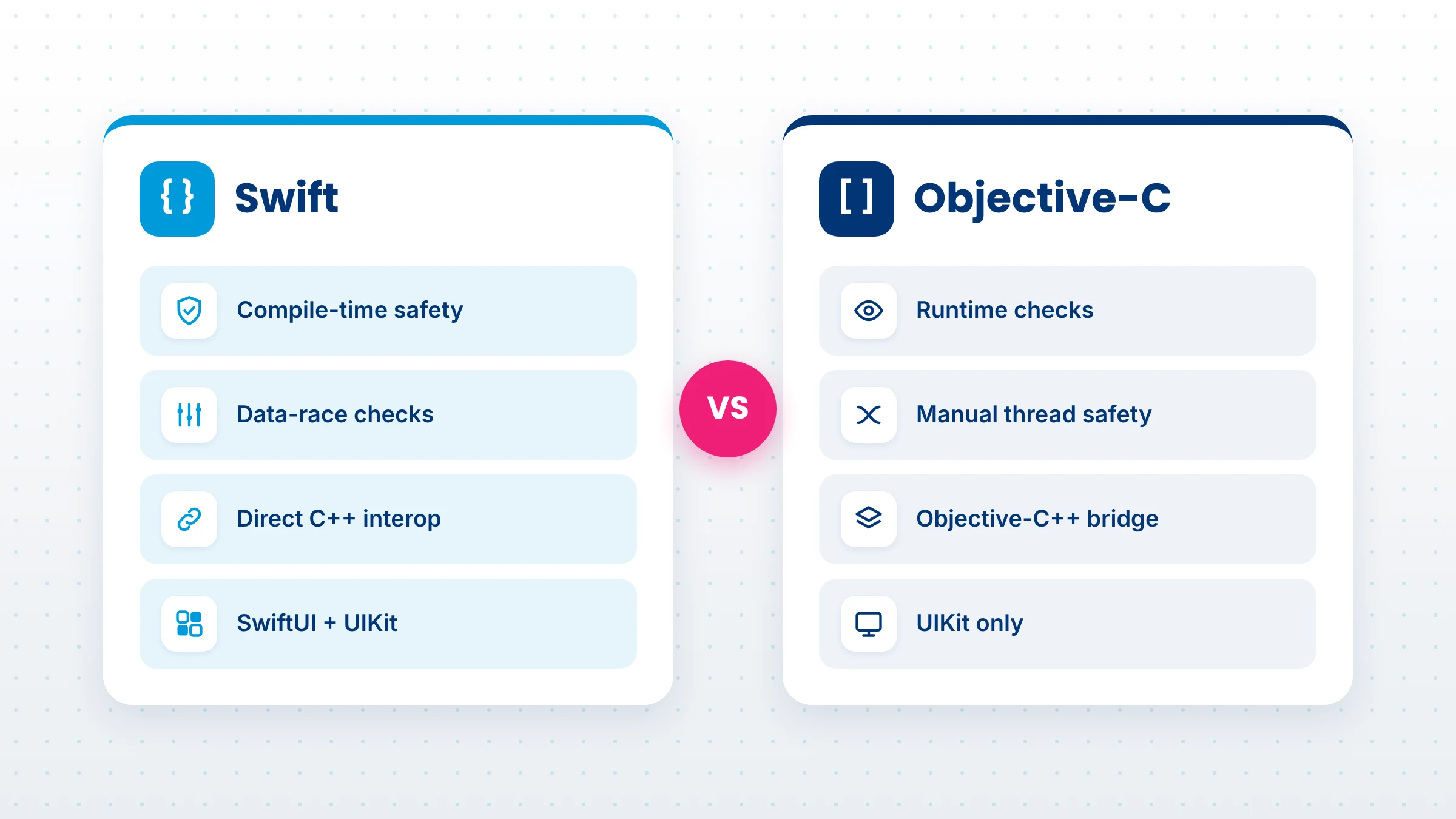
The table below sums up the difference between Objective-C and Swift on the points that affect delivery, risk and cost.
| Factor | Swift | Objective-C |
|---|---|---|
| Syntax | Concise, with type inference, dot syntax and one .swift file per type | Verbose bracket messaging, with separate .h header and .m implementation files |
| Type safety | Statically typed; optionals make missing values explicit | Dynamically typed at runtime; messages sent to nil are silently ignored |
| Memory management | Automatic Reference Counting (ARC), with value types reducing shared state | ARC in modern code; older code may still use manual retain and release |
| Concurrency | async/await, actors and compile-time data-race safety in Swift 6 mode | Grand Central Dispatch and locks, with safety left to the developer |
| Performance | Static dispatch and value types give the compiler more room to optimize | Dynamic message dispatch adds overhead on hot paths |
| Interoperability | Calls Objective-C, C and C++ directly; Swift 6.4 adds @c for C headers | Calls C directly and C++ through Objective-C++; sees Swift only through @objc |
| UI frameworks | SwiftUI and UIKit | UIKit only |
| Tooling | Swift Package Manager, Swift Testing, Xcode previews, open-source toolchain | Xcode and CocoaPods-era tooling; few new tools target it |
| Talent pool | Default language for new iOS engineers and Apple’s documentation | Shrinking group of specialists, often senior |
| Best fit | New apps, new features and long-term products | Maintaining legacy code and existing C or C++ bridges |
Syntax is the most visible difference between Objective-C and Swift, but it is rarely the one that decides a project. These are the areas that change how an iOS app behaves, how fast a team ships and what it costs to keep running.
In Objective-C, many mistakes surface only at runtime. A message sent to nil returns nil or zero without an error, so a missing object can travel through several layers before something visibly breaks. Collections are loosely typed unless the team adds lightweight generics by hand.
Swift makes these cases explicit. A value that might be missing has to be declared as an optional and unwrapped before use, and types are checked at compile time. The result is that a whole category of crashes and silent failures is caught while the code is being written rather than after release.
This is the largest gap between the two languages today, and most comparison articles skip it. Objective-C apps handle background work with Grand Central Dispatch, operation queues and locks. These tools work, but nothing stops two threads from touching the same mutable state, so data races show up as intermittent crashes that are hard to reproduce.
Swift’s structured concurrency uses async/await, tasks and actors, and the Swift 6 language mode checks isolation at compile time. If code could cause a data race, it does not build. For apps with heavy networking, syncing, media processing or real-time features, that is a meaningful drop in production risk. Swift 6.2’s approachable concurrency also lets UI-heavy targets default to the main actor, which removes much of the annotation work that slowed early adopters.
Many articles still quote speed figures from Swift’s 2014 launch. Those numbers came from narrow algorithm tests on early compilers and say little about a modern app.
The structural difference is real. Objective-C resolves every method call at runtime through message dispatch, while Swift can use static dispatch, inlining and value types that avoid heap allocation. Recent releases add InlineArray, Span and non-copyable types for low-level, allocation-free code without unsafe pointers. In a typical business app, though, speed is usually set by rendering, network calls and data access, not by the language. Swift’s practical gain is that safe code is also fast code, so teams spend less time hand-tuning hot paths.
Swift and Objective-C were designed to live side by side. Swift calls Objective-C APIs through a bridging header or module imports, and Objective-C can use Swift classes that are exposed with @objc and inherit from an Objective-C class such as NSObject. There is one firm limit: according to Apple’s migration documentation, you cannot subclass a Swift class in Objective-C.
C and C++ were once the strongest reasons to stay with Objective-C, because Objective-C++ could call C++ code directly. That advantage has narrowed. Swift’s C++ interoperability, introduced in Swift 5.9, lets Swift call many C++ APIs without a wrapper layer, Swift 6.2 added a safe interop mode, and Swift 6.4’s @c attribute lets Swift implement functions declared in C headers. Objective-C++ is still the more proven route for some large C++ engines, but it is no longer the only one.
UIKit works with both languages. SwiftUI, Apple’s declarative UI framework, works only with Swift, and so do many of the experiences built on it, such as widgets. A team that stays on Objective-C can keep building UIKit screens, but it cannot adopt SwiftUI without introducing Swift into the codebase.
In day-to-day work, Swift programming vs Objective-C feels like a different pace of coding. Swift code is shorter and easier to scan. Type inference removes most explicit type declarations, method calls use dot syntax instead of square brackets, statements need no semicolons and each type lives in one file instead of a header and implementation pair. Objective-C’s long, descriptive method names can be very readable once learned, but they add boilerplate and make onboarding slower for engineers who learned Swift first.
Also Read: SwiftUI vs UIKit
In iOS development, Swift vs Objective-C is not always a clean break. Writing Objective-C off entirely leads to poor decisions, such as rewriting stable code that earns money and has no open problems. It still makes sense in these cases:
In each case, the honest position is “keep and contain” rather than “expand.” New features can still be written in Swift alongside the existing Objective-C code.
For leadership, the Objective-C vs Swift question is mostly about people, cost and exposure over the next several years.
Hiring. Apple’s documentation, sample code and WWDC sessions are Swift-first, so engineers entering iOS development learn Swift. Objective-C expertise still exists, but it is concentrated in a smaller, more senior group. A product that depends on two or three Objective-C specialists carries key-person risk: if they leave, the replacement search is slower and onboarding takes longer.
Maintenance cost. A mixed codebase is normal during a transition, but it has overhead. Teams maintain bridging headers, think about how each type is exposed across languages, and deal with longer build times in mixed targets. Language choice feeds directly into build and support budgets, which is why it belongs in the same discussion as overall iOS app development cost.
Long-term risk. Staying on Objective-C does not break anything today. The risk is gradual: each year, more new Apple frameworks, third-party libraries and developer tools assume Swift. An Objective-C-only app ends up building workarounds for features its competitors get by default, and the eventual migration grows larger the longer it waits.
In iOS development, Swift vs Objective-C usually comes down to where your codebase is today and how long the product needs to live.
Choose Swift if:
Stay with Objective-C, for now, if:
Go mixed if you have a substantial Objective-C app that still has years of roadmap ahead. Write every new feature in Swift, keep stable Objective-C modules as they are and migrate the rest in planned phases. This is the path most established apps take.
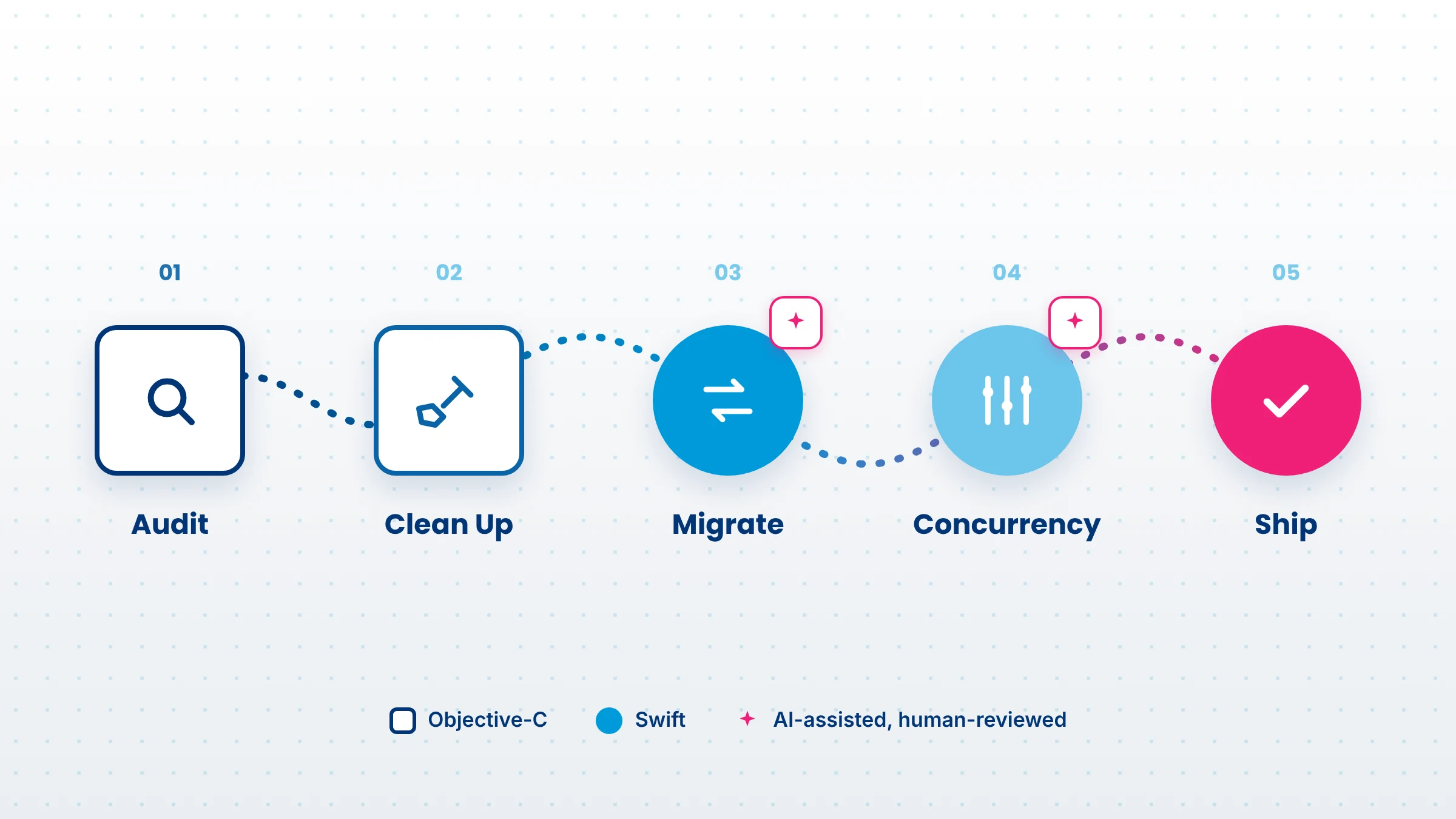
Once the Objective-C vs Swift decision is made, the next question is how to move. Apple’s own guidance is clear that you don’t need to rewrite an app in one go. Swift and Objective-C can share a target, so migration can run alongside normal releases. This sequence keeps risk low:
Large language models are now a practical tool for this kind of modernization, as long as they are used to speed up engineers rather than replace their review. They work well for:
They are weaker where meaning depends on runtime behavior: swizzling, KVO, message-to-nil semantics, Core Foundation memory ownership and decisions about actor isolation. These need an experienced iOS engineer.
A workflow that holds up in production looks like this: write tests first, let the model draft the Swift version, compile and fix it, have an engineer review the change line by line, run the full test suite and release behind a feature flag where possible. Teams that want to make this repeatable across several apps, with clear review gates and approved tools, can shape it through AI consulting services before scaling it.
Also Read: Mobile App Development Trends
The Swift vs Objective-C decision is settled for new work. Swift is safer, catches concurrency bugs at compile time, unlocks SwiftUI and Apple’s newer frameworks, and is the language the iOS talent market is built around. Objective-C remains a sound choice for keeping stable legacy code and existing C++ bridges running, not for starting something new.
For most established apps, the right move is a gradual one: write new features in Swift, contain the Objective-C that works and migrate the rest in measured phases. A modern Swift codebase also makes the next round of product work easier, from on-device intelligence to features built with AI development services, and it keeps your mobile app development roadmap aligned with where Apple is heading.
Yes. Objective-C still powers many established iOS apps, third-party SDKs and older Apple frameworks, and Xcode continues to compile it. It is rarely chosen for new projects, though. Apple’s newer frameworks, documentation and tooling are Swift-first, so most teams keep Objective-C only for existing code they maintain.
Swift has structural advantages, including static dispatch, inlining and value types that avoid heap allocation, while Objective-C resolves every method call at runtime. In real apps the gap is usually small because rendering, networking and data access set the pace. Choose Swift for safety and maintainability, with performance as a bonus.
Yes. Swift and Objective-C can live in the same app target. Swift uses Objective-C code through a bridging header, and Objective-C uses Swift classes marked with @objc that inherit from NSObject. One limit applies: Objective-C cannot subclass Swift classes. This mixed setup is what makes phased migration possible.
Migrate if the app has a long roadmap, changes often or needs SwiftUI and newer Apple frameworks. Keep stable, rarely changed Objective-C code as it is. The safest approach is to write all new features in Swift and migrate existing modules in phases, starting with leaf classes and frequently changed areas.
Swift. In the Swift vs Objective-C choice for a new app, Swift gives you compile-time safety, structured concurrency, SwiftUI support, modern tooling and a much larger hiring pool. Objective-C only makes sense for a new project if it must extend an existing Objective-C codebase or SDK that cannot change.
It depends on codebase size, test coverage and how much C or C++ the app wraps. A small app can move in weeks, while a large one is usually migrated in phases over months or longer alongside regular releases. An audit of modules, dependencies and tests gives the most reliable estimate.

Based on this article's topic
See how on-device AI works in mobile apps, which Android, iOS and cross-platform frameworks to use, real use cases and the steps to build.
Jetpack Compose in 2027: learn what it is, how it compares with XML, why Android 17 is Compose-first, and how to plan your Android app migration and costs.
SwiftUI vs UIKit in 2027: compare cost, speed, AI features and foldable support to choose the right framework for your iOS app, with a clear migration path.