What Is LLMOps? Lifecycle, Tools and Best Practices for Production LLMs
Learn what LLMOps is, how it differs from MLOps, the full LLMOps lifecycle, key tools and best practices for running LLM applications in production.
Nov 11, 2026 Artificial Intelligence
Most companies find out what their AI really costs the same way. Someone in finance forwards an invoice and asks what happened. The pilot that cost a few hundred dollars a month is now a production feature serving thousands of users, an internal agent is calling a large model forty times per task, and three teams share one API key, so nobody can say who spent what. That is usually the point where AI cost optimization moves from a nice idea to an urgent priority.
None of this means AI is too expensive to run. It means AI spend behaves differently from the cloud costs most companies already know how to manage, and it needs its own approach.
At Xicom, we build and maintain AI systems for businesses in the US and around the world, and cost has become one of the first questions clients ask after accuracy. This guide explains where AI costs come from, how to calculate them per request, the strategies that reduce them, and the mistakes that quietly push them back up.
AI cost optimization is the practice of measuring, attributing and reducing the cost of running AI systems, including model inference, GPU infrastructure, data retrieval and agent execution, without lowering the output quality that users and the business depend on.
The goal is not the smallest possible bill. It is a bill that grows in line with the value the system delivers. In practice, that means knowing what each request costs, which team or feature generated it, and whether there is a cheaper way to get the same result.
Cloud spend is mostly tied to what you provision: servers, storage and reserved capacity. If you know how many instances are running, you can forecast the bill with reasonable accuracy. AI spend breaks that model in four ways.
Every request is billed on the text that goes in and the text that comes out. A longer prompt, a wordier answer or one extra retrieved document changes the price of that call, and those small changes multiply across millions of requests.
Two users asking similar questions can cost very different amounts if one of them triggers three retrieval steps and a retry. Usage volume alone does not predict spend.
An AI agent may call a model, use a tool, read the result and call the model again, several times for a single task. Without limits, one stuck loop can burn through a day’s budget in an hour.
ML engineers pick the model, product teams define the features, platform teams run the infrastructure and finance pays the invoice. When responsibility is split four ways, waste builds up in the gaps.
This is why standard cloud cost tools, which report spend by account or service, often cannot tell you which feature or agent is driving your AI bill.
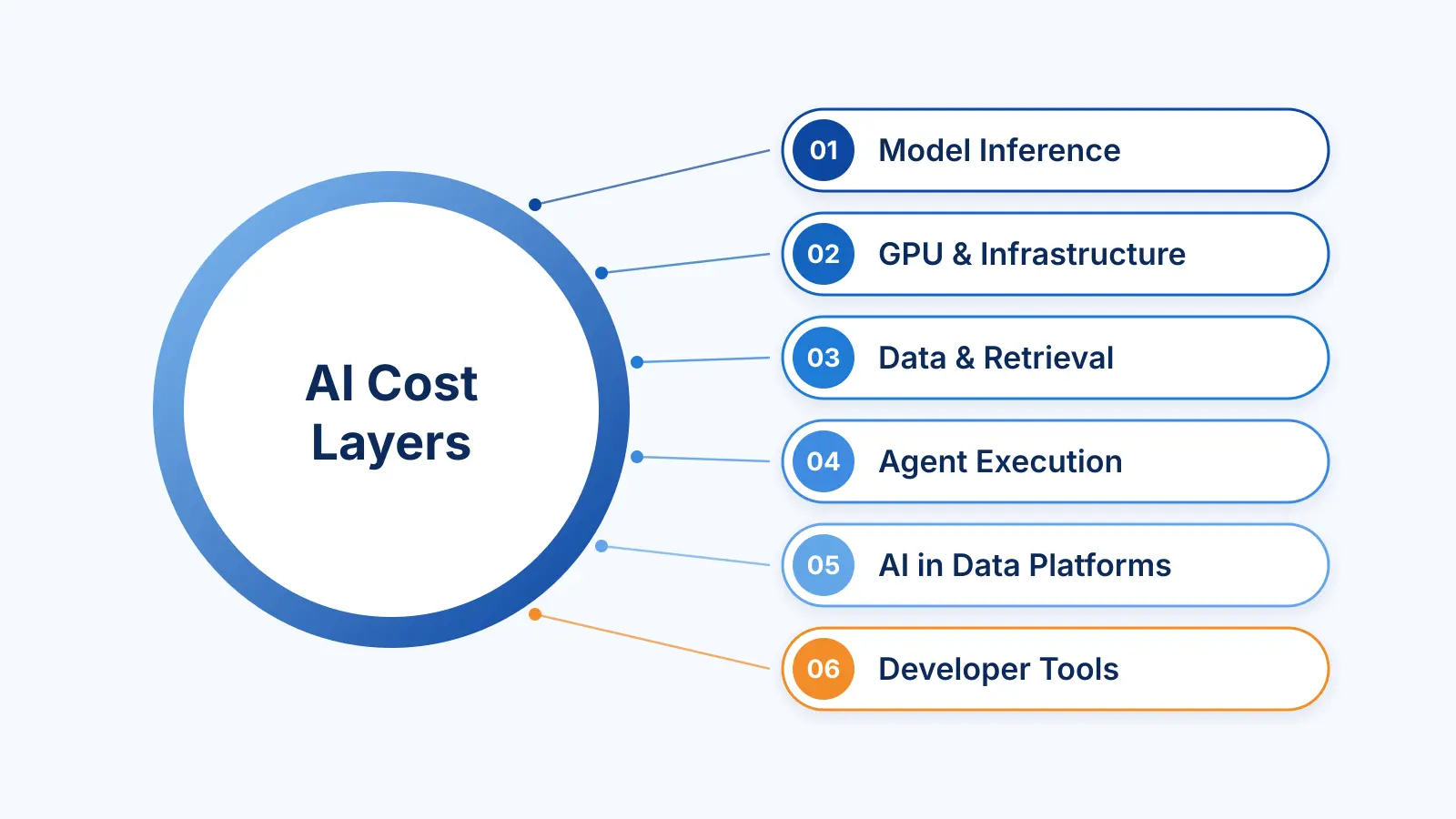
AI spend sits across six layers, and most teams only watch one or two of them. A useful first exercise is to check which of these your organization pays for today.
| Cost layer | What drives the cost | Main lever |
|---|---|---|
| Model inference (APIs) | Input and output tokens, model tier, retries | Model routing, prompt design, caching |
| GPU and infrastructure | Idle or over-provisioned GPUs, hosting, fine-tuning runs | Autoscaling, right-sizing, batching |
| Data and retrieval | Embeddings, vector database size, context sent to the model | Better chunking, filtering, re-ranking |
| Agent execution | Model and tool calls per task, loops | Step limits, per-task token budgets |
| AI inside data platforms | AI functions billed inside tools like Snowflake or Databricks | Usage tracking, query-level limits |
| Developer tools | Coding assistants and agents used by engineering teams | Usage policies, model choice, seat reviews |
The last two are easy to miss because they rarely show up as their own line item. They tend to sit inside a data platform bill or a software subscription, so nobody connects them to the AI budget.
Before you can reduce AI spend, you need a number you can track: the cost of a single request. For a model accessed through an API, the basic formula is:
Cost per request = (input tokens × input price) + (output tokens × output price)
Prices are usually quoted per million tokens, and output tokens typically cost several times more than input tokens. On top of this, add the cost of retrieval (embeddings and vector search), any retries, and any extra calls an agent makes to finish the task.
A worked example (illustrative prices, not a specific provider’s rates)
Say a customer support assistant uses a model priced at $3 per million input tokens and $15 per million output tokens. Each request sends 1,500 input tokens (system prompt, conversation history and retrieved help articles) and gets back 400 output tokens.
At 200,000 requests a day, that comes to $2,100 a day, or about $63,000 a month.
Now make two changes. Trim the system prompt and retrieved context so each request sends 900 input tokens, and ask for shorter answers so the model returns 250 output tokens. Cost per request falls to $0.00645, or about $38,700 a month.
Then route 60% of requests, the simple ones like order status or password resets, to a smaller model priced at $0.25 and $1.25 per million tokens. The blended cost drops to roughly $0.0029 per request, or about $17,400 a month.
Same assistant, same traffic, and a bill that is less than a third of where it started. Your numbers will be different, but the pattern holds: small savings per request turn into large savings per month at scale.
Track cost per outcome, not just cost per request. A cheap request that fails and gets retried three times is not cheap. The more useful metric is cost per resolved ticket, per processed document or per completed task.
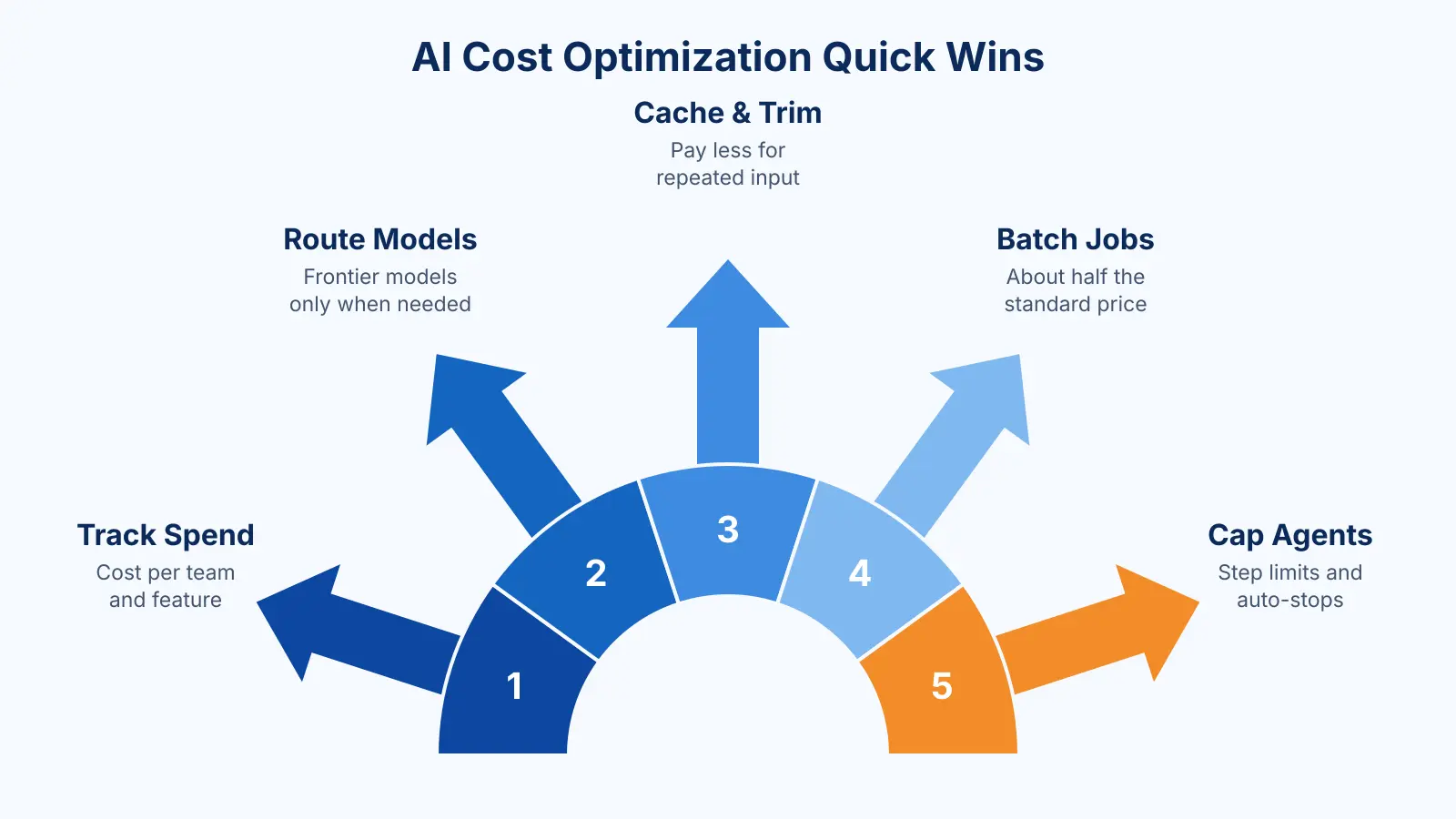
The strategies below are ordered roughly the way we would tackle them on a real project: measure first, pick up the quick wins, then make the deeper architectural changes.
You cannot fix spend you cannot see broken down. Tag every request with the team, feature, model and environment that generated it, and track tokens per request, cache hit rate, retry rate and cost per outcome over time.
Teams doing this for the first time often find that a handful of workflows account for most of the bill. Those workflows are rarely the most complex ones. More often, they are prototype prompts that went to production without anyone revisiting them.
Then give someone ownership. A dashboard nobody acts on saves nothing, so assign an engineer or a small group to review AI spend every sprint or every month.
Many applications send every request to the most capable model because that is how the prototype was built. Yet most production traffic is routine: classification, data extraction, short answers and summaries. A routing layer checks each request and sends the simple ones to a smaller, cheaper model, keeping the frontier model for tasks that need deeper reasoning.
A practical first step is to list your ten highest-volume use cases and test each one on a smaller model against a fixed set of real examples. Keep the expensive model only where quality actually drops.
Every word in a system prompt is paid for on every call. Prompts tend to grow during development, picking up repeated instructions, unused examples and long policy text, and that can quietly double input costs.
Shorter, clearer prompts often improve answer quality as well as cost.
Major model providers offer prompt caching, which bills repeated input, such as a long system prompt or a reference document, at a reduced rate when it appears at the start of the prompt in exactly the same form. To benefit, keep static content at the top of the prompt and put the user-specific part at the end.
Semantic caching goes a step further. It stores answers to earlier questions and returns a saved response when a new question means the same thing, skipping the model call entirely. For support bots and internal knowledge assistants, where the same questions come up every day, this can remove a large share of calls.
Retrieval-augmented generation (RAG) is often the biggest hidden cost in an AI application. Many implementations pull several long passages for every query and send all of them to the model, relevant or not. You pay for every token of that context.
Better retrieval means sending less:
Good retrieval lowers cost and usually improves accuracy at the same time.
Also Read: RAG vs Fine-Tuning
For high-volume, narrow tasks, a general-purpose frontier model is often more than the job needs. Three options are worth evaluating:
These options take upfront engineering work, so they make the most sense when a single task runs thousands of times a day and its requirements are stable. NVIDIA researchers make a similar case, arguing that small language models are capable enough, and far more economical, for the repetitive and narrow tasks that make up much of an AI agent’s work (NVIDIA). Our AI model fine-tuning services and SLM development teams usually start by testing whether a smaller model can match the current one on the client’s own data.
If you host your own models, idle GPUs are one of the fastest ways to waste money. Common fixes include:
Check GPU utilization before buying more capacity. Low utilization usually points to a scheduling problem, not a capacity problem.
Not every AI task needs an answer in under a second. Report generation, document tagging, data enrichment and overnight analysis can wait minutes or hours. Most major providers, including OpenAI, Anthropic and Google, offer batch APIs that process requests asynchronously at about half the standard price. OpenAI, for example, prices batch requests at a 50% discount compared with its real-time API (OpenAI).
A simple test: if no person is waiting on the response, the workload is a candidate for batch processing.
Agents need guardrails that work without anyone watching. Before an agent goes to production, define:
An agent that starts looping at 2 a.m. should stop itself, not wait for someone to notice in the morning. We build these limits into every project our AI agent development team delivers.
The cheapest time to control AI cost is during design. Before a new feature launches, estimate its cost per request at expected volume and check whether the business value justifies it. Early decisions, such as which model family to use, whether to rely on RAG or fine-tuning, and how agents are structured, are much harder to change once the system is live.
This is where an experienced AI development partner adds the most value: building cost checks into architecture reviews instead of fixing the bill after launch. For systems already in production, AI cost optimization consulting gives you an outside review of where spend can come down without hurting quality.
Also Read: AI App Development Cost
There is no single answer. It depends mostly on how much traffic you have and how steady it is.
| Factor | API (hosted models) | Self-hosted (open-source models) |
|---|---|---|
| Cost at low volume | Lower, since you pay only for what you use | Higher, since GPUs cost money even when idle |
| Cost at high, steady volume | Can become expensive | Often lower per request once utilization is high |
| Upfront effort | Minimal | Significant: deployment, scaling, monitoring |
| Ongoing engineering | Low | Needs MLOps skills to run reliably |
| Model capability | Access to the most capable models | Strong open models, though they may trail the top models on complex tasks |
| Data control | Data goes to a provider, under enterprise terms | Data stays in your own environment |
| Customization | Limited to what the provider offers | Full control over fine-tuning and serving |
Self-hosting starts to pay off when traffic is high and predictable enough to keep GPUs busy most of the day. If usage is low, spiky or still uncertain, APIs are usually cheaper once you count the engineering time needed to run your own infrastructure.
Many companies settle on a hybrid: frontier models through an API for complex, lower-volume tasks, and a fine-tuned open model in their own cloud for high-volume, repetitive work. If you are weighing this choice, our LLM development team can model both options against your real traffic.
Assuming fewer tokens always means a lower bill. For simple calls it usually does, but agents are different. PointFive tested four configurations of a coding agent across 2,848 analyzed runs and found that the setup that cut tool-output tokens the most (38.4%) ended up with a 6.8% higher billed cost (source). When you strip out context the agent still needs, it takes extra steps to finish the job, and those steps cost more than you saved. Measure every change against the actual bill, not a token counter.
Optimizing before measuring. Switching models or compressing prompts without a baseline makes it impossible to tell whether anything worked. Set up cost tracking first.
Sending everything to the biggest model. It is the easiest setup to build and the most expensive one to run. Most traffic does not need it.
Leaving AI spend without an owner. When engineering, product and finance each assume someone else is watching, nobody is.
Launching agents without limits. Step caps and spend alerts take hours to add before launch and can save thousands after it.
Cutting cost at the expense of quality. A cheaper model that gives wrong answers costs more in support tickets, rework and lost trust. Test quality on real examples before you switch.
Use this as a quick review for any AI system already in production:
Xicom has been building software for clients since 2002 and now develops AI systems for businesses in the US and worldwide. We treat cost as a design requirement, alongside accuracy, security and speed. That means choosing the right model for each task, fine-tuning or building smaller models where the volume justifies it, designing RAG pipelines that send only what the model needs, and putting budgets and limits around AI agents before they go live.
Whether you are planning a new AI product or trying to bring an existing AI bill under control, our AI cost optimization consulting starts with a review of your current setup. Our AI consulting team maps where your spend goes, tests cheaper model and architecture options on your own data, and shows you where the savings are.
AI cost optimization is not a one-time cleanup. It is a habit: measure what each request costs, send each task to the cheapest model that handles it well, and put limits around anything that can run on its own.
Start with visibility, pick up the quick wins in routing, prompts and caching, then move stable, high-volume work to fine-tuned or smaller models. Teams that build these checks into how they design AI systems keep quality high while costs stay predictable.
AI cost optimization is the practice of measuring, attributing and reducing what it costs to run AI systems, including model API calls, GPU infrastructure, data retrieval and AI agents, while keeping output quality where the business needs it. It combines technical changes, such as model routing and caching, with operational habits like cost tracking and clear ownership of AI spend.
Cloud cost optimization manages provisioned resources like servers and storage, which scale fairly predictably with what is running. AI costs scale with tokens, request complexity and the number of steps an agent takes, so two similar requests can cost very different amounts. AI cost work also covers areas cloud tools rarely track, such as prompt design, retrieval quality and model selection.
It depends on how the system was built. Teams that have never optimized usually find the largest savings in model routing, prompt trimming, caching and RAG improvements. Industry guides such as Cloudchipr’s report reductions of 30 to 60% for teams that treat it as an ongoing practice. The only reliable way to know your number is to measure cost per request before and after each change.
Not always. For single model calls, fewer tokens usually means a lower bill. For AI agents, removing context the agent still needs can make it take extra steps, which adds cost back. PointFive’s benchmark of coding agents found the setup with the biggest token reduction had a higher billed cost. Always judge changes by the actual invoice.
Self-hosting can be cheaper when traffic is high and steady enough to keep GPUs busy most of the time. For low, unpredictable or early-stage usage, APIs are usually cheaper once you include the engineering effort needed to deploy, scale and maintain your own models. Many companies use both, matching each workload to the option that suits it.
FinOps for AI applies financial operations practices to AI workloads. It means attributing AI spend to the teams, features and models that generate it, setting budgets, reviewing costs regularly, and making engineering, product and finance share responsibility. It extends traditional cloud FinOps to cover token-based pricing, GPU usage and AI agents.

Based on this article's topic
Learn what LLMOps is, how it differs from MLOps, the full LLMOps lifecycle, key tools and best practices for running LLM applications in production.
SLM vs LLM explained: learn the difference between SLM and LLM in cost, speed, accuracy and privacy, with real examples and an easy way to choose the right one.
RAG vs fine tuning explained: key differences, costs, and when to use each or both. A practical decision framework for teams building real LLM products.