How to Integrate Android AppFunctions Into an AI-Powered Mobile App
Learn how to integrate Android AppFunctions into an AI-powered mobile app: what to expose, how to describe it for agents, permissions, testing and rollout.
Nov 2, 2026 App Development
Booking a doctor should not take an eight-minute phone call, but for many patients it still does. Phreesia’s survey of more than 4,000 patients found that scheduling by phone takes over eight minutes on average, while 84% said they would book online if given the option.
That gap between what patients want and what clinics offer is exactly why doctor appointment app development keeps attracting hospitals, clinic chains, and digital health startups. A well-built app fills empty slots, cuts front-desk workload, and gives patients the self-service experience they already get from banking and travel apps.
This guide walks you through everything you need to plan the product: app types, must-have and AI features, architecture, compliance, the build process, real cost ranges, and monetization.
Quick Answer
Doctor appointment app development is the process of building a mobile and web platform where patients find doctors, see real-time availability, book or reschedule visits, pay, and receive reminders, while doctors and admins manage schedules from their own panels. A focused MVP typically takes 3 to 5 months and costs roughly $25,000 to $50,000 with an offshore team. A full platform with telehealth, EHR integration, and AI features usually runs $90,000 to $180,000 or more and takes 8 to 12 months.
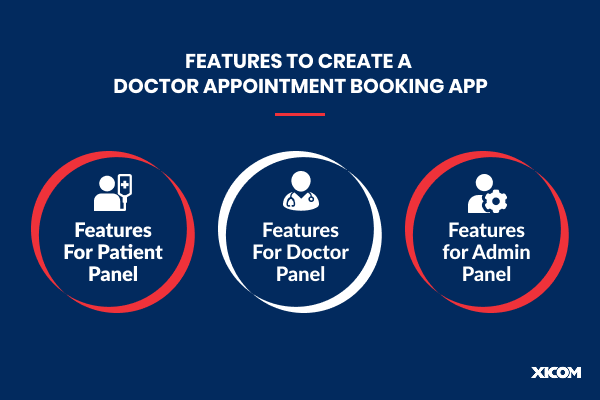
A doctor appointment app is a digital scheduling platform that connects patients with healthcare providers and automates the full booking cycle: search, slot selection, confirmation, reminders, payment, and follow-up. Most products run on three connected interfaces.
How a typical booking flows:
The business case rests on three numbers: patient demand for digital booking, the cost of empty slots, and steady market growth.
| Signal | What the Data Says |
|---|---|
| Patient demand | 84% of surveyed patients would book, and 82% would reschedule, a visit online if offered |
| Provider choice | 68% of patients are more likely to choose providers that let them book, change, or cancel online |
| Phone friction | Booking by phone takes more than eight minutes on average |
| Cost of no-shows | A 12-year study across 10 clinics found an 18.8% mean no-show rate, at about $196 per missed visit |
| Market growth | Medical scheduling software is projected to grow from about $496 million to $872 million by 2031, near 12% a year |
| Where spend goes | Patient scheduling held over 58% of that market, and cloud deployment about 69% |
For providers, the payoff shows up in fuller schedules, fewer inbound calls, and faster collections. For startups and digital health companies, it is a proven category where differentiation comes from a sharper niche, better integrations, and smarter automation rather than from being first.
Before you develop a doctor appointment app, decide which model you are building. The model shapes your feature list, integrations, compliance scope, and revenue.
| App Type | Who It Serves | Real-World Examples | What Makes It Work |
|---|---|---|---|
| Multi-provider marketplace | Patients searching across many independent doctors | Zocdoc, Practo, Doctolib | Large verified provider network, strong search, reviews, insurance filters |
| Provider-owned app | Patients of one hospital, health system, or clinic chain | MyChart-style patient portals, clinic-branded apps | Deep EHR integration, existing patient base, follow-up and records access |
| On-demand and telehealth-first | Patients who want care now, often by video | Teladoc, Included Health (formerly Doctor On Demand) | Instant matching, video infrastructure, licensed clinician coverage |
| Specialty app | One care area such as mental health, dental, pediatrics, or physiotherapy | Therapy and dental booking platforms | Niche intake forms, recurring sessions, specialty workflows |
| White-label SaaS | Clinics that want a branded booking app without building one | Practice management add-ons | Multi-tenant architecture, per-clinic configuration, subscription billing |
If you are planning on demand doctor app development, budget early for real-time clinician availability and video, because the product only works when a doctor actually answers within minutes. If you are a provider, a branded app tied to your existing systems usually delivers faster ROI than a marketplace. Specialty ideas such as mental health apps are often the easiest way to stand out against large marketplaces.
An MVP needs fewer features than most teams think, but each one has to work flawlessly. Here is the core set, split by panel.
Also Read: Medication Management App Development
Basic booking is now table stakes. AI is where newer apps win on efficiency, and the money is following: Grand View Research estimates the AI in medical scheduling software market will grow at about 28% a year through 2033 (Grand View Research). Features worth planning for:
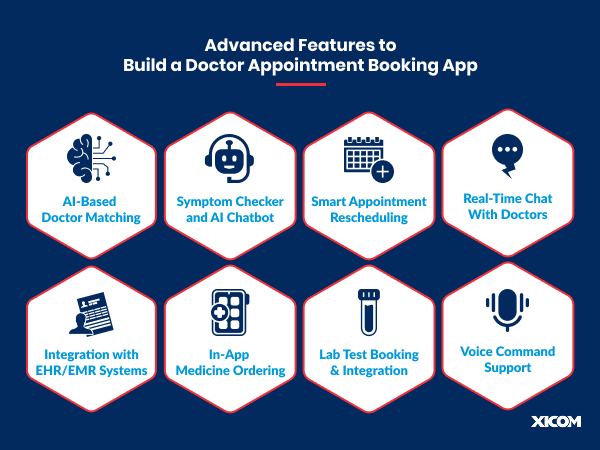
These features need clean data pipelines and careful guardrails. Working with an experienced AI development company helps you pick models that are accurate, explainable, and safe to run on health data.
A doctor appointment app is mostly an integration project. The booking screens are the easy part; the hard part is keeping availability, records, and payments in sync across systems you do not control.
A typical architecture has five layers:
Recommended tech stack:
| Layer | Common Choices |
|---|---|
| Mobile apps | Swift (iOS), Kotlin (Android), or Flutter / React Native for cross-platform |
| Web panels | React, Next.js, Angular |
| Backend | Node.js, Python (Django/FastAPI), Java (Spring Boot), .NET |
| Databases | PostgreSQL, MySQL, MongoDB, Redis for caching and slot locks |
| Cloud | AWS, Microsoft Azure, Google Cloud (HIPAA-eligible services under a BAA) |
| EHR interoperability | HL7 FHIR R4 APIs, SMART on FHIR, HL7 v2 interfaces for older systems |
| Video and messaging | Zoom Video SDK, Vonage, Agora, WebRTC; Twilio or similar for SMS |
| Payments | Stripe, Braintree, PayPal, plus card-on-file for co-pays |
| Calendars | Google Calendar API, Microsoft Graph (Outlook) |
| AI and analytics | OpenAI, Claude, or Gemini APIs; Python ML libraries; BI dashboards |
| Testing and CI/CD | XCTest, Espresso, Appium, Jest, GitHub Actions, Jenkins |
Native or cross-platform? Cross-platform frameworks such as Flutter and React Native let one team ship both apps faster and at lower cost, which suits most MVPs. Go native when you need heavy video, wearable integrations, or platform-specific accessibility features. Whichever path you choose, an experienced mobile app development team should own the scheduling engine design, because double-bookings and slot race conditions are the bugs patients notice first.
If your app stores or transmits protected health information (PHI) for a healthcare provider, it falls under HIPAA, and every vendor that touches that data needs a Business Associate Agreement (BAA). Consumer health apps outside HIPAA can still fall under the FTC’s Health Breach Notification Rule, and apps serving users in Europe must follow GDPR.
| Regulation | When It Applies | What It Means for Your App |
|---|---|---|
| HIPAA and HITECH | You handle PHI for, or as, a covered entity | Risk analysis, access controls, encryption, audit logs, breach notification, BAAs with cloud and SDK vendors |
| FTC Health Breach Notification Rule | Consumer health apps not covered by HIPAA | Notify users and the FTC after unauthorized disclosure of health data |
| GDPR | You process data of people in the EU | Lawful basis, explicit consent for health data, data subject rights, DPIAs |
| PCI DSS | You accept card payments | Use a compliant payment processor and never store raw card data |
| WCAG 2.1 / 2.2 | Accessibility for all users | Readable contrast, large tap targets, screen-reader labels |
Security controls to build in from day one:
HHS has proposed the biggest overhaul of the HIPAA Security Rule in over a decade, including mandatory MFA, encryption, and asset inventories. At the time of writing it is not yet final, with HHS listing July 2027 as its target (Fierce Healthcare). Building to those controls now avoids an expensive retrofit later. For a deeper walkthrough, see our guide to HIPAA-compliant app development.
Here is the process we recommend when you build a doctor appointment app, with typical timelines for each phase.
Define your target users, care model, and unique value. Study competitors such as Zocdoc and Practo, map patient and doctor pain points, and confirm which systems you must integrate with. The output is a scoped requirements document, a compliance map, and a business case.
List every feature, then cut it to what one booking journey needs end to end: search, profile, booking, reminders, payment, and the doctor schedule view. Everything else goes on the roadmap.
Map user journeys for patients, doctors, and admins, then build wireframes and a clickable prototype. Test it with real patients, including older users, and fix friction before any code is written.
Choose native or cross-platform, design the scheduling engine and data model, and plan integrations with EHR, calendars, payments, and video. Lock in a HIPAA-eligible cloud and sign BAAs with vendors.
Build the backend, patient app, doctor panel, and admin console in two-week sprints, with a demo at the end of each. If you lack in-house capacity, you can hire mobile app developers to extend your team for this phase, or add specialists such as Android developers for platform-specific work.
Test booking edge cases such as two patients grabbing the same slot, time-zone changes, and cancellations. Add security, performance, accessibility, and integration testing with the real EHR sandbox.
Run a HIPAA risk assessment or GDPR audit, finalize privacy policies, and prepare App Store and Google Play listings. Health apps often get extra review scrutiny, so leave buffer time.
Track booking conversion, no-show rate, and app ratings. Ship fixes and new features based on user feedback, and keep OS versions, SDKs, and security patches current.
Doctor appointment app development cost depends mostly on three things: how many integrations you need, whether you include telehealth and AI, and where your team is located. The ranges below cover the patient app, doctor panel, admin console, and backend.
| Scope | What Is Included | Timeline | Offshore Team (e.g., India) | US / Western Europe Team |
|---|---|---|---|---|
| MVP | Cross-platform patient app, doctor web panel, admin, search, booking, reminders, payments | 3 to 5 months | $25,000 to $50,000 | $80,000 to $150,000 |
| Mid-level app | MVP plus video consults, e-prescriptions, one EHR integration, insurance details | 5 to 8 months | $50,000 to $90,000 | $150,000 to $250,000 |
| Advanced platform | Multi-provider marketplace, multiple EHRs, AI matching and no-show prediction, eligibility checks, analytics | 8 to 12+ months | $90,000 to $180,000+ | $250,000+ |
A simple way to estimate: Total Cost = Estimated Development Hours × Blended Hourly Rate. Rates vary widely by region, which is why the same scope can differ by two to three times between teams.
Costs that teams often forget:
Treat these as ballpark figures. For a realistic number, get a scoped estimate based on your feature list and integrations. If you are also exploring virtual care, our breakdown of telemedicine app development cost covers video-first products in more detail.
The right revenue model depends on who pays: providers, patients, or partners. Most successful apps combine two or three of these.
| Model | Who Pays | How It Works | Best Fit |
|---|---|---|---|
| Provider subscription | Doctors or clinics | Monthly fee per provider or location for listing and scheduling tools | Marketplaces, white-label SaaS |
| Per-booking fee | Providers | Fixed fee charged when a new patient books, a model Zocdoc uses | Marketplaces with strong patient traffic |
| Telehealth commission | Providers or patients | Percentage of each paid video consultation | On-demand and telehealth-first apps |
| Patient membership | Patients | Premium plan with priority booking, free follow-up chats, or family accounts | Direct-to-consumer apps |
| Featured listings | Providers | Paid placement in search results, clearly labeled as sponsored | Large marketplaces |
| Partner services | Pharmacies, labs | Referral fees for medicine orders or lab bookings made in-app | Full-service health platforms |
One rule applies to every model: never sell or share identifiable patient data, and keep ad tracking away from health information. Beyond the legal risk, a single trust breach can undo years of growth in this category.
Also Read: Women Health Tracking App Development
Most delays in doctor appointment application development come from the same handful of problems. Plan for them early and they stay small.
| Challenge | Why It Happens | How to Solve It |
|---|---|---|
| Double bookings and slot conflicts | Two users or systems grab the same slot at once | Slot locking with short holds, a single source of truth for availability, and two-way calendar sync |
| Legacy EHR integration | Older systems lack modern APIs or use custom formats | Use FHIR APIs where available, HL7 v2 interfaces or middleware where not, and test early in vendor sandboxes |
| Low doctor adoption | Doctors resist yet another tool | Sync with the calendars and EHR they already use, keep the doctor panel minimal, and train staff |
| Poor patient adoption | Complex onboarding or confusing booking flow | Guest booking, three-tap scheduling, family profiles, and accessible design for older users |
| Persistent no-shows | Reminders alone are not enough | Two-way confirmations, easy rescheduling, waitlist backfill, and AI risk scoring |
| Peak-time performance | Morning booking spikes overload servers | Autoscaling cloud infrastructure, caching, and load testing before launch |
| Multi-region compliance | Rules differ by country and state | Build a privacy-by-design core, then layer region-specific consent and data residency settings |
Xicom has spent more than 20 years building software for 750+ clients across 50+ countries, with 1,800+ projects delivered and a 4.8 rating on Clutch. Our healthcare app development teams bring that experience to every doctor appointment app development solution we build.
Whether you are a clinic going digital or a startup planning a new marketplace, our doctor appointment booking app development process gets a working product into patients’ hands quickly, then scales it as you grow.
Patients already expect to book care the way they book everything else: in a few taps, at any hour. A focused app that nails booking, reminders, and integration delivers value fast, and AI features then turn it into a real operational advantage. Start with a tight MVP, build compliance in from day one, and choose a partner who understands both healthcare workflows and modern app engineering.
A basic MVP typically costs $25,000 to $50,000 with an offshore team, or $80,000 to $150,000 with a US-based team. Advanced platforms with telehealth, multiple EHR integrations, and AI features range from about $90,000 to $250,000 or more, depending on scope and team location.
An MVP usually takes 3 to 5 months. A mid-level app with video consults and EHR integration takes 5 to 8 months, and a full marketplace platform can take 8 to 12 months or longer.
If the app stores or transmits protected health information for a healthcare provider or health plan, yes. That means encryption, access controls, audit logs, a risk analysis, and BAAs with every vendor that handles PHI. Apps serving users in the EU also need GDPR compliance.
Yes. Most modern EHRs, including Epic, Oracle Health, and athenahealth, offer HL7 FHIR APIs that let an app read availability, create appointments, and access patient records with consent. Older systems may need HL7 v2 interfaces or middleware.
Yes. Many MVPs start with the app as the scheduling source of truth, synced to doctors’ Google or Outlook calendars. You can add EHR integration later once the booking flow is proven.
Patient sign-up, doctor search and profiles, real-time booking, automated reminders, payments, a doctor schedule panel, and an admin dashboard. Video consults and AI features can follow in later releases.
Cross-platform frameworks like Flutter and React Native suit most MVPs because one codebase serves iOS and Android. Native development is better for heavy video, wearable integrations, or advanced accessibility needs.
They send automated, two-way reminders, make rescheduling one tap, backfill cancelled slots from a waitlist, and can use AI to flag high-risk bookings for extra follow-up.

Based on this article's topic
Learn how to integrate Android AppFunctions into an AI-powered mobile app: what to expose, how to describe it for agents, permissions, testing and rollout.
How long does it take to develop an app? See typical timelines by complexity, phase, platform and app type, plus practical ways to launch sooner.
Swift vs Objective-C compared on safety, concurrency, performance, interop and hiring, plus a practical playbook for migrating legacy iOS code.